
Tag Page

How to configure Microsoft Outlook 2010 to Send & Receive Mail

If you've just started using Wild Planet as your email service provider, there are a few configuration changes you will need to make in your Microsoft Outlook before you can begin sending and receiving mail. Up to now, your Outlook has been configured to log into your previous email servers, but now you must give it the instructions it needs to log into ours.

There are quite a few versions of Microsoft Outlook, but the settings are the same for all of them. The only thing that is different is how you get to the Account Settings area. Below you will find instructions for Outlook 2010; we are currently working on instructions for Outlook 2000, 2003, 2007, and 2013.


1. Start the Microsoft Outlook program.

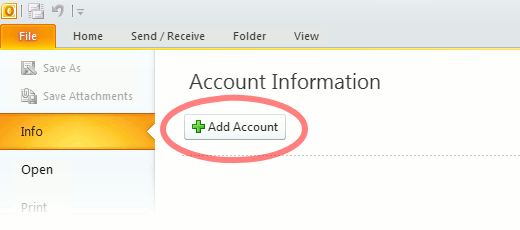
Use the Start menu to start Outlook 2010. If you’ve never used Outlook before, it will prompt you to create a new account. In that case, skip ahead to step 2. If you’ve previously used Outlook and it doesn’t prompt you, click the File tab, then the Add Account button (see image below).

Or, if you have been using Outlook previously and simply need to reconfigure it in order to use our email servers, then look for your existing account in the Account Settings window, and then click the CHANGE button. (because you will be CHANGING existing account settings). Skip to Step 4 below.
outlook2010 1

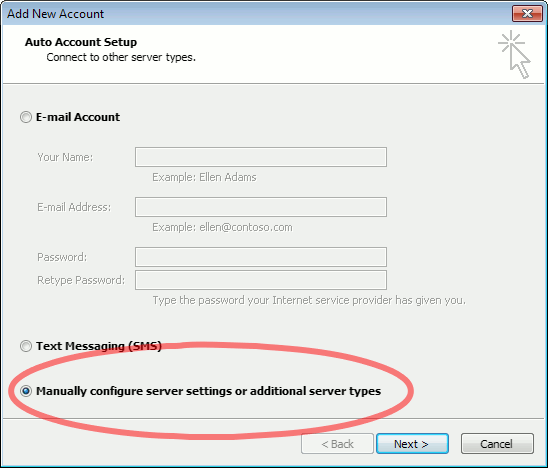
2. The “Auto Account Setup” screen appears.

When this window appears, leave the spaces empty, choose the Manually configure server settings or additional server types option, then click Next.
outlook2010 2

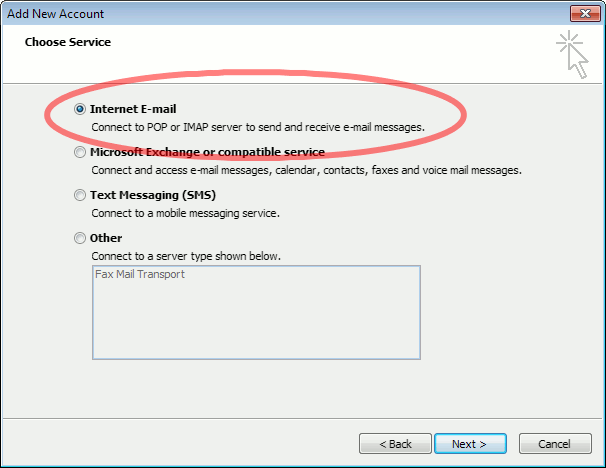
3. The “Choose Service” screen appears.

Choose Internet E-mail, then click Next.
Outlook 2010

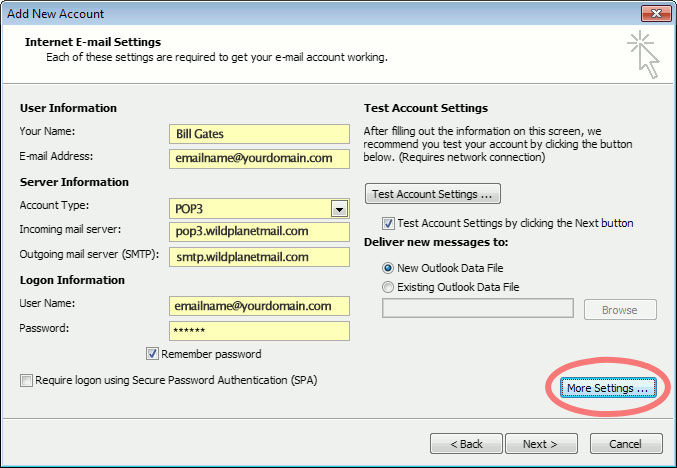
4. The “Internet E-mail Settings” screen appears.

This is the window where you’ll enter most of your account settings. You want the window to look like this:
Outlook 2010
  • “Your Name” is the name that other people will see when you send them e-mail. It should usually be your real name, such as Bill Gates or Joan of Arc.
  • Enter your “E-mail Address”. The address must be the e-mail address of the mailbox you created in your account management control panel.
  • For “Account Type”, choose POP3.
  • Enter pop3.wildplanetmail.com for the “Incoming mail server” and smtp.wildplanetmail.com for the “Outgoing mail server (SMTP)”.
  • Enter your (full) e-mail address again as the “User Name”. (The user name must be all lowercase).
  • Type your e-mail password into the “Password” box. This is the password you chose for this e-mail address when you created the mailbox in your account management control pane (unless we have created it for you). This password may be different from your master “My Account” password with our company.
  • Make sure that “Require logon using Secure Password Authentication (SPA)” is not checked.
  • Do not click “Test Account Settings” or “Next” yet; they will not work until you complete the next steps.

5. View “More Settings”.

Click the More Settings button. A new “Internet E-mail Settings” window appears.

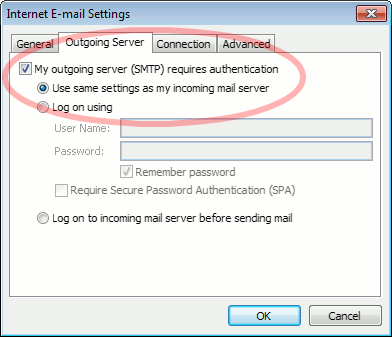
6. Choose the “Outgoing Server” tab.

In the “Outgoing Server” tab, check My outgoing server (SMTP) requires authentication and make sure Use same settings as my incoming mail server is selected:
Outlook 2010 outgoing authentication


7. Close the “Internet E-mail Settings” window.

Click OK to close the “Internet E-mail Settings” window. The “Add New Account” screen will still be visible.

8. Test the settings.

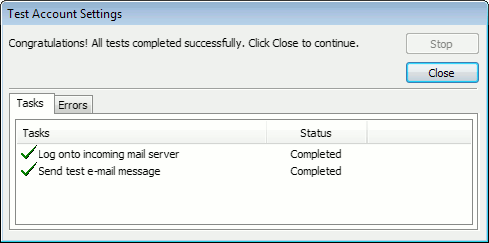
Click Next. Outlook will test the settings, then should tell you that “all tests completed successfully”:
outlook2010 10

If Outlook tells you a test failed, double-check to be sure you’ve entered the settings correctly.

9. Finish the wizard.

If the “Test Account Settings” window is still open, click Close to continue.

Click Finish to finish the wizard.

Outlook setup is complete

You’re finished! Try sending yourself a test e-mail message to make sure it works.

Read 1117197 times Last modified on %AM, %07 %246 %2015 %04:%Mar

About The Author

Super User

Lorem ipsum dolor sit amet, consectetur adipiscing elit, sed do eiusmod tempor incididunt ut labore et dolore magna aliqua. Ut enim ad minim veniam, quis nostrud exercitation ullamco laboris nisi ut aliquip ex ea commodo consequat. Duis aute irure dolor in reprehenderit in voluptate velit esse cillum dolore eu fugiat nulla pariatur.

183165 comments

  • golden goose shoes
    Comment Link golden goose shoes %PM, %28 %643 %2022 %14:%Jan

    I am only commenting to make you know what a fantastic discovery my friend's girl obtained using the blog. She picked up too many details, most notably what it is like to possess a great giving mindset to have many people without hassle thoroughly grasp chosen complicated topics. You undoubtedly did more than people's expected results. Many thanks for providing such essential, healthy, explanatory not to mention cool tips about your topic to Kate.

  • lebron shoes
    Comment Link lebron shoes %PM, %28 %643 %2022 %14:%Jan

    I wanted to construct a quick message so as to say thanks to you for these pleasant instructions you are sharing on this website. My time-consuming internet investigation has at the end of the day been rewarded with pleasant content to talk about with my guests. I would declare that we site visitors are unequivocally fortunate to live in a very good network with so many marvellous people with very beneficial concepts. I feel quite happy to have discovered the web site and look forward to plenty of more thrilling times reading here. Thanks a lot again for all the details.

  • michael jordan shoes
    Comment Link michael jordan shoes %PM, %28 %643 %2022 %14:%Jan

    I precisely desired to say thanks yet again. I am not sure the things I would have followed without the techniques shared by you relating to that theme. Completely was a hard problem in my opinion, but being able to see the very expert technique you solved the issue made me to leap with delight. I am just happier for this guidance and as well , hope that you really know what a powerful job that you are putting in educating people thru your site. I know that you've never met all of us.

  • supreme clothing
    Comment Link supreme clothing %PM, %28 %643 %2022 %14:%Jan

    My husband and i felt cheerful when Jordan could round up his researching with the precious recommendations he had from your own web page. It's not at all simplistic to just be giving freely instructions which often others might have been making money from. So we see we've got the writer to thank for that. The specific illustrations you have made, the straightforward site menu, the relationships you can help to instill - it's everything fabulous, and it's really leading our son and the family understand that subject matter is thrilling, and that's quite mandatory. Thank you for the whole lot!

  • a bathing ape
    Comment Link a bathing ape %PM, %28 %642 %2022 %14:%Jan

    I not to mention my friends were found to be digesting the nice procedures on your web blog while the sudden I got a horrible suspicion I never expressed respect to the web site owner for those tips. All the guys are actually so very interested to read all of them and have now undoubtedly been tapping into those things. Thanks for being really kind and also for finding some quality information most people are really desirous to be informed on. Our honest regret for not expressing gratitude to earlier.

  • off white hoodie
    Comment Link off white hoodie %PM, %28 %642 %2022 %14:%Jan

    I am just writing to make you understand of the great discovery my cousin's daughter encountered going through your web site. She even learned a good number of issues, most notably what it is like to have an amazing teaching style to have many others easily fully understand various tricky matters. You undoubtedly did more than our desires. Thank you for coming up with these powerful, healthy, edifying and cool guidance on this topic to Tanya.

  • lebron 16
    Comment Link lebron 16 %PM, %28 %642 %2022 %14:%Jan

    I would like to get across my gratitude for your kindness giving support to men and women who must have help with this particular theme. Your personal dedication to getting the message around turned out to be particularly useful and has made guys and women much like me to attain their pursuits. Your new useful tips and hints can mean so much a person like me and somewhat more to my mates. Many thanks; from everyone of us.

  • kd shoes
    Comment Link kd shoes %PM, %28 %642 %2022 %14:%Jan

    I wish to voice my appreciation for your kindness supporting those people that need guidance on this one subject matter. Your personal commitment to getting the message all around became wonderfully advantageous and have surely allowed many people like me to get to their desired goals. Your amazing invaluable report signifies this much to me and somewhat more to my office workers. Best wishes; from everyone of us.

  • russell westbrook shoes
    Comment Link russell westbrook shoes %PM, %28 %642 %2022 %14:%Jan

    I would like to point out my love for your kindness supporting those people that have the need for help with in this matter. Your real dedication to getting the message up and down appears to be astonishingly functional and has in most cases empowered most people just like me to reach their objectives. Your entire interesting publication indicates a whole lot a person like me and especially to my office colleagues. Regards; from everyone of us.

  • moncler jackets
    Comment Link moncler jackets %PM, %28 %642 %2022 %14:%Jan

    I simply had to thank you so much again. I'm not certain the things that I would've implemented without these tactics shown by you relating to such area. It was actually the frightful difficulty in my position, however , being able to view a new expert way you solved the issue forced me to jump for joy. Now i'm happier for the support and then hope you realize what a great job you are putting in instructing most people through the use of your site. Most probably you have never got to know any of us.

Leave a comment

Make sure you enter all the required information, indicated by an asterisk (*). HTML code is not allowed.

Flickr Stream






