
Tag Page

How to configure Microsoft Outlook 2010 to Send & Receive Mail

If you've just started using Wild Planet as your email service provider, there are a few configuration changes you will need to make in your Microsoft Outlook before you can begin sending and receiving mail. Up to now, your Outlook has been configured to log into your previous email servers, but now you must give it the instructions it needs to log into ours.

There are quite a few versions of Microsoft Outlook, but the settings are the same for all of them. The only thing that is different is how you get to the Account Settings area. Below you will find instructions for Outlook 2010; we are currently working on instructions for Outlook 2000, 2003, 2007, and 2013.


1. Start the Microsoft Outlook program.

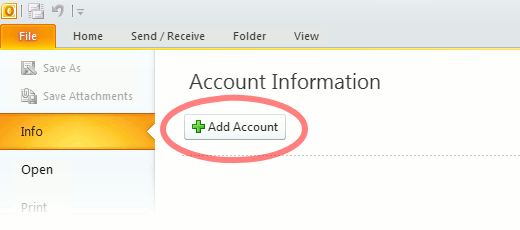
Use the Start menu to start Outlook 2010. If you’ve never used Outlook before, it will prompt you to create a new account. In that case, skip ahead to step 2. If you’ve previously used Outlook and it doesn’t prompt you, click the File tab, then the Add Account button (see image below).

Or, if you have been using Outlook previously and simply need to reconfigure it in order to use our email servers, then look for your existing account in the Account Settings window, and then click the CHANGE button. (because you will be CHANGING existing account settings). Skip to Step 4 below.
outlook2010 1

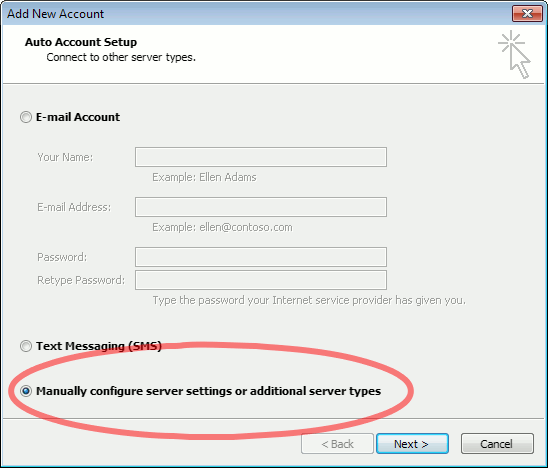
2. The “Auto Account Setup” screen appears.

When this window appears, leave the spaces empty, choose the Manually configure server settings or additional server types option, then click Next.
outlook2010 2

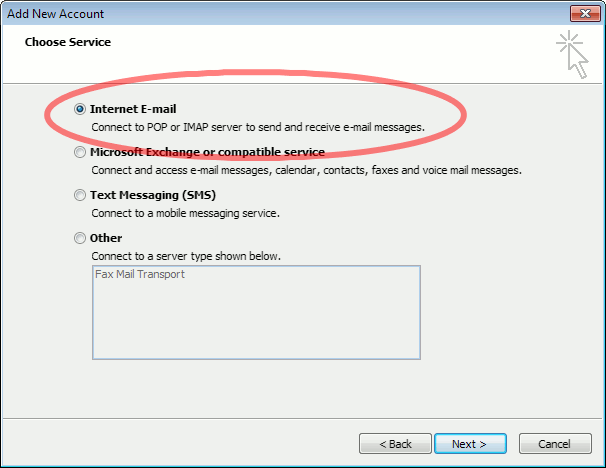
3. The “Choose Service” screen appears.

Choose Internet E-mail, then click Next.
Outlook 2010

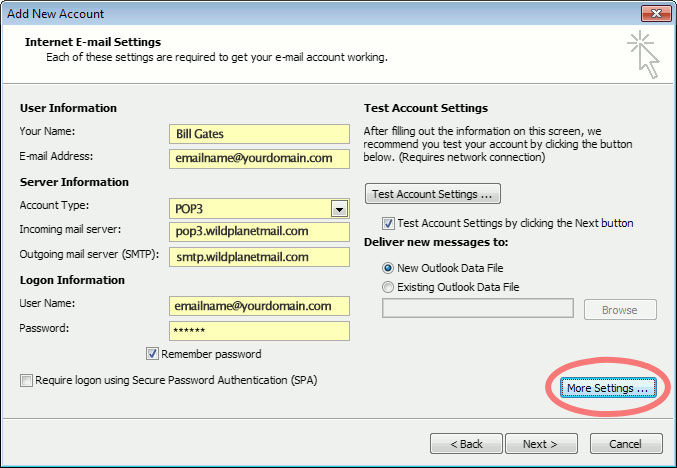
4. The “Internet E-mail Settings” screen appears.

This is the window where you’ll enter most of your account settings. You want the window to look like this:
Outlook 2010
  • “Your Name” is the name that other people will see when you send them e-mail. It should usually be your real name, such as Bill Gates or Joan of Arc.
  • Enter your “E-mail Address”. The address must be the e-mail address of the mailbox you created in your account management control panel.
  • For “Account Type”, choose POP3.
  • Enter pop3.wildplanetmail.com for the “Incoming mail server” and smtp.wildplanetmail.com for the “Outgoing mail server (SMTP)”.
  • Enter your (full) e-mail address again as the “User Name”. (The user name must be all lowercase).
  • Type your e-mail password into the “Password” box. This is the password you chose for this e-mail address when you created the mailbox in your account management control pane (unless we have created it for you). This password may be different from your master “My Account” password with our company.
  • Make sure that “Require logon using Secure Password Authentication (SPA)” is not checked.
  • Do not click “Test Account Settings” or “Next” yet; they will not work until you complete the next steps.

5. View “More Settings”.

Click the More Settings button. A new “Internet E-mail Settings” window appears.

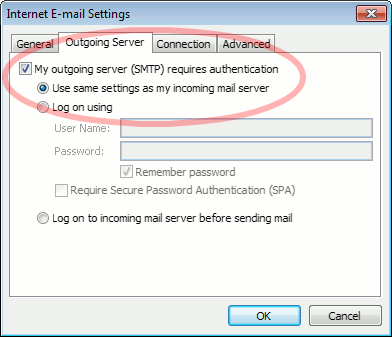
6. Choose the “Outgoing Server” tab.

In the “Outgoing Server” tab, check My outgoing server (SMTP) requires authentication and make sure Use same settings as my incoming mail server is selected:
Outlook 2010 outgoing authentication


7. Close the “Internet E-mail Settings” window.

Click OK to close the “Internet E-mail Settings” window. The “Add New Account” screen will still be visible.

8. Test the settings.

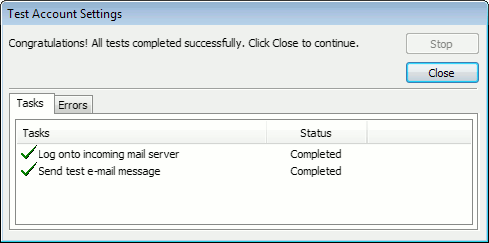
Click Next. Outlook will test the settings, then should tell you that “all tests completed successfully”:
outlook2010 10

If Outlook tells you a test failed, double-check to be sure you’ve entered the settings correctly.

9. Finish the wizard.

If the “Test Account Settings” window is still open, click Close to continue.

Click Finish to finish the wizard.

Outlook setup is complete

You’re finished! Try sending yourself a test e-mail message to make sure it works.

Read 1110691 times Last modified on %AM, %07 %246 %2015 %04:%Mar

About The Author

Super User

Lorem ipsum dolor sit amet, consectetur adipiscing elit, sed do eiusmod tempor incididunt ut labore et dolore magna aliqua. Ut enim ad minim veniam, quis nostrud exercitation ullamco laboris nisi ut aliquip ex ea commodo consequat. Duis aute irure dolor in reprehenderit in voluptate velit esse cillum dolore eu fugiat nulla pariatur.

182076 comments

  • kyrie 6
    Comment Link kyrie 6 %PM, %01 %847 %2022 %19:%Feb

    Thanks a lot for providing individuals with such a wonderful opportunity to check tips from here. It is usually very pleasing and also stuffed with a lot of fun for me and my office co-workers to visit your site at a minimum thrice every week to learn the latest stuff you have. And definitely, we're always contented for the staggering advice you give. Selected 2 areas in this posting are certainly the most effective we've had.

  • supreme clothing
    Comment Link supreme clothing %PM, %01 %847 %2022 %19:%Feb

    I would like to show some thanks to the writer for bailing me out of this type of issue. After researching through the world wide web and obtaining methods that were not powerful, I believed my entire life was over. Existing without the answers to the difficulties you've sorted out through the short article is a critical case, as well as those that would have badly damaged my career if I had not discovered the blog. The competence and kindness in dealing with all areas was crucial. I'm not sure what I would've done if I had not come across such a solution like this. I am able to at this time look ahead to my future. Thanks very much for this specialized and effective guide. I won't think twice to refer your web sites to anybody who needs and wants assistance about this situation.

  • kevin durant shoes
    Comment Link kevin durant shoes %PM, %01 %793 %2022 %18:%Feb

    My wife and i got fulfilled when Chris could finish off his research out of the ideas he had through your web pages. It's not at all simplistic to just be handing out thoughts the others might have been trying to sell. We discover we have got the writer to appreciate for this. All the explanations you made, the simple blog navigation, the relationships you will help to instill - it's got many fantastic, and it is letting our son and us understand this theme is fun, and that is wonderfully fundamental. Thanks for all the pieces!

  • golden goose outlet
    Comment Link golden goose outlet %PM, %01 %793 %2022 %18:%Feb

    I would like to point out my respect for your kind-heartedness supporting those people who have the need for guidance on the theme. Your special dedication to getting the solution along came to be amazingly advantageous and have continually encouraged ladies just like me to get to their aims. Your entire invaluable suggestions means much to me and a whole lot more to my office workers. Thanks a lot; from all of us.

  • authentic jordans
    Comment Link authentic jordans %PM, %01 %793 %2022 %18:%Feb

    I together with my pals were looking through the excellent helpful tips on the website and so at once came up with an awful suspicion I never expressed respect to the website owner for those strategies. Most of the guys are already certainly excited to study all of them and now have clearly been enjoying these things. Appreciation for actually being really helpful as well as for making a decision on variety of perfect areas millions of individuals are really eager to know about. My very own honest apologies for not saying thanks to sooner.

  • moncler jackets
    Comment Link moncler jackets %PM, %01 %792 %2022 %18:%Feb

    Thanks so much for giving everyone a very superb possiblity to check tips from this web site. It's usually so useful plus jam-packed with amusement for me and my office acquaintances to search your web site on the least thrice in a week to find out the newest guides you will have. And indeed, I'm at all times satisfied with your staggering principles you give. Certain 3 ideas in this article are certainly the very best we have had.

  • bape clothing
    Comment Link bape clothing %PM, %01 %792 %2022 %18:%Feb

    I precisely had to thank you so much yet again. I'm not certain the things that I might have achieved without the entire ways documented by you relating to my area of interest. Previously it was the scary concern in my opinion, nevertheless encountering this specialized tactic you managed it forced me to leap with fulfillment. I will be grateful for your help and in addition pray you recognize what a great job you happen to be putting in educating the others through the use of your website. I am sure you have never encountered all of us.

  • moncler
    Comment Link moncler %PM, %01 %792 %2022 %18:%Feb

    Thanks for your whole effort on this web site. Kim takes pleasure in doing investigations and it's really easy to understand why. We notice all concerning the powerful method you provide precious guidelines through the website and as well boost participation from the others on this idea while our princess is without question discovering a lot. Enjoy the rest of the year. You have been carrying out a really great job.

  • supreme t shirt
    Comment Link supreme t shirt %PM, %01 %792 %2022 %18:%Feb

    I together with my friends were viewing the best points found on your website and then suddenly I got a terrible suspicion I never thanked the web blog owner for them. All of the ladies are already for that reason happy to learn all of them and have now in reality been using these things. We appreciate you simply being very thoughtful as well as for deciding upon these kinds of exceptional subject matter millions of individuals are really eager to learn about. My personal sincere apologies for not saying thanks to sooner.

  • jordans
    Comment Link jordans %PM, %01 %565 %2022 %12:%Feb

    I'm also writing to make you be aware of of the superb encounter my cousin's daughter went through studying your webblog. She mastered too many things, which include how it is like to have a very effective helping mindset to get many more easily comprehend some multifaceted issues. You undoubtedly did more than my expectations. Thanks for supplying the useful, trustworthy, revealing and easy thoughts on that topic to Janet.

Leave a comment

Make sure you enter all the required information, indicated by an asterisk (*). HTML code is not allowed.

Flickr Stream






