
Tag Page

How to configure Microsoft Outlook 2010 to Send & Receive Mail

If you've just started using Wild Planet as your email service provider, there are a few configuration changes you will need to make in your Microsoft Outlook before you can begin sending and receiving mail. Up to now, your Outlook has been configured to log into your previous email servers, but now you must give it the instructions it needs to log into ours.

There are quite a few versions of Microsoft Outlook, but the settings are the same for all of them. The only thing that is different is how you get to the Account Settings area. Below you will find instructions for Outlook 2010; we are currently working on instructions for Outlook 2000, 2003, 2007, and 2013.


1. Start the Microsoft Outlook program.

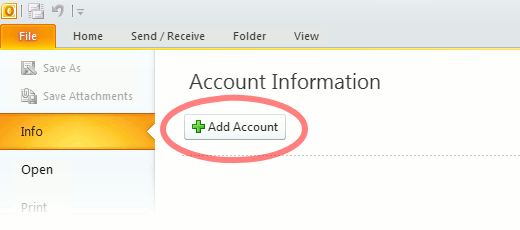
Use the Start menu to start Outlook 2010. If you’ve never used Outlook before, it will prompt you to create a new account. In that case, skip ahead to step 2. If you’ve previously used Outlook and it doesn’t prompt you, click the File tab, then the Add Account button (see image below).

Or, if you have been using Outlook previously and simply need to reconfigure it in order to use our email servers, then look for your existing account in the Account Settings window, and then click the CHANGE button. (because you will be CHANGING existing account settings). Skip to Step 4 below.
outlook2010 1

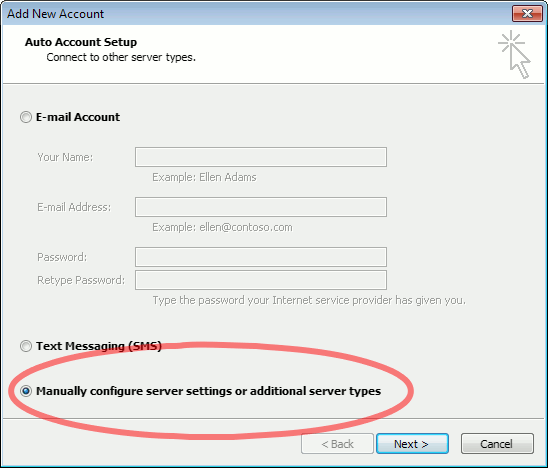
2. The “Auto Account Setup” screen appears.

When this window appears, leave the spaces empty, choose the Manually configure server settings or additional server types option, then click Next.
outlook2010 2

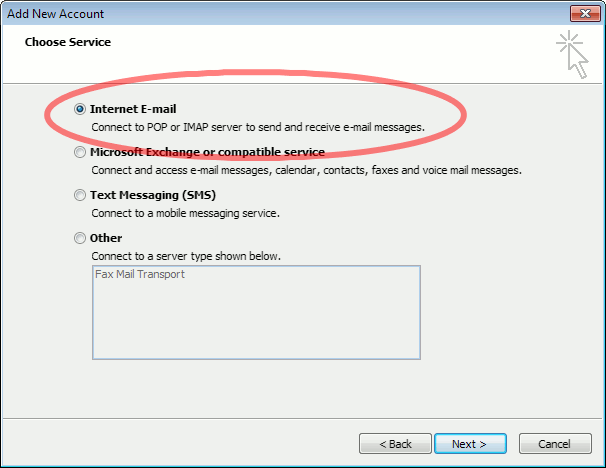
3. The “Choose Service” screen appears.

Choose Internet E-mail, then click Next.
Outlook 2010

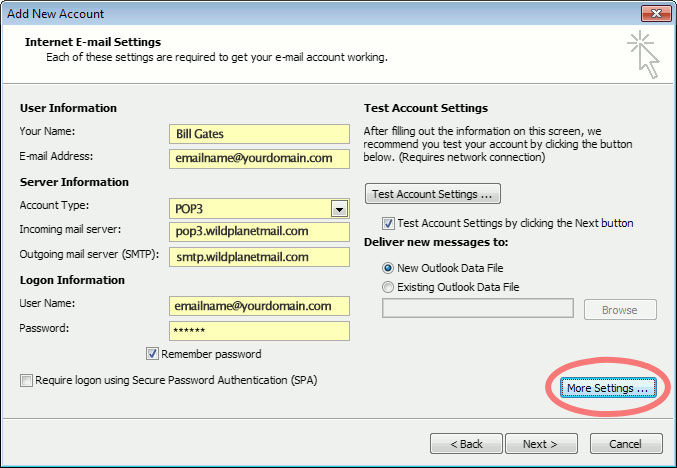
4. The “Internet E-mail Settings” screen appears.

This is the window where you’ll enter most of your account settings. You want the window to look like this:
Outlook 2010
  • “Your Name” is the name that other people will see when you send them e-mail. It should usually be your real name, such as Bill Gates or Joan of Arc.
  • Enter your “E-mail Address”. The address must be the e-mail address of the mailbox you created in your account management control panel.
  • For “Account Type”, choose POP3.
  • Enter pop3.wildplanetmail.com for the “Incoming mail server” and smtp.wildplanetmail.com for the “Outgoing mail server (SMTP)”.
  • Enter your (full) e-mail address again as the “User Name”. (The user name must be all lowercase).
  • Type your e-mail password into the “Password” box. This is the password you chose for this e-mail address when you created the mailbox in your account management control pane (unless we have created it for you). This password may be different from your master “My Account” password with our company.
  • Make sure that “Require logon using Secure Password Authentication (SPA)” is not checked.
  • Do not click “Test Account Settings” or “Next” yet; they will not work until you complete the next steps.

5. View “More Settings”.

Click the More Settings button. A new “Internet E-mail Settings” window appears.

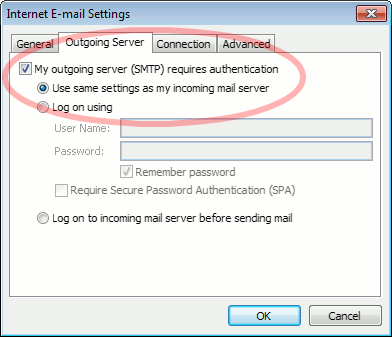
6. Choose the “Outgoing Server” tab.

In the “Outgoing Server” tab, check My outgoing server (SMTP) requires authentication and make sure Use same settings as my incoming mail server is selected:
Outlook 2010 outgoing authentication


7. Close the “Internet E-mail Settings” window.

Click OK to close the “Internet E-mail Settings” window. The “Add New Account” screen will still be visible.

8. Test the settings.

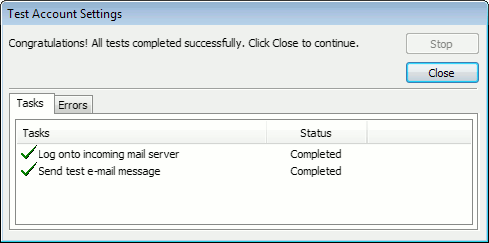
Click Next. Outlook will test the settings, then should tell you that “all tests completed successfully”:
outlook2010 10

If Outlook tells you a test failed, double-check to be sure you’ve entered the settings correctly.

9. Finish the wizard.

If the “Test Account Settings” window is still open, click Close to continue.

Click Finish to finish the wizard.

Outlook setup is complete

You’re finished! Try sending yourself a test e-mail message to make sure it works.

Read 1130920 times Last modified on %AM, %07 %246 %2015 %04:%Mar

About The Author

Super User

Lorem ipsum dolor sit amet, consectetur adipiscing elit, sed do eiusmod tempor incididunt ut labore et dolore magna aliqua. Ut enim ad minim veniam, quis nostrud exercitation ullamco laboris nisi ut aliquip ex ea commodo consequat. Duis aute irure dolor in reprehenderit in voluptate velit esse cillum dolore eu fugiat nulla pariatur.

183857 comments

  • adidas yeezy
    Comment Link adidas yeezy %AM, %11 %515 %2022 %11:%Apr

    My spouse and i were very delighted when Raymond could do his research with the precious recommendations he made out of the site. It's not at all simplistic to simply continually be freely giving techniques which often people have been trying to sell. We already know we need the website owner to appreciate for that. The explanations you've made, the easy website navigation, the friendships you will help instill - it is everything powerful, and it's really making our son and us reason why this idea is amusing, and that is very pressing. Many thanks for everything!

  • yeezy boost 500
    Comment Link yeezy boost 500 %AM, %11 %514 %2022 %11:%Apr

    I together with my buddies were found to be checking the best techniques on your site and then all of the sudden developed an awful feeling I had not thanked the website owner for those tips. All of the young men happened to be for that reason stimulated to read through all of them and have now simply been loving them. Thank you for genuinely indeed considerate and also for selecting this form of great topics most people are really desirous to be aware of. Our own sincere apologies for not expressing gratitude to earlier.

  • curry 8
    Comment Link curry 8 %AM, %11 %513 %2022 %11:%Apr

    My husband and i got so cheerful when John managed to round up his researching while using the ideas he was given out of your web pages. It is now and again perplexing just to happen to be handing out information that others have been selling. Therefore we discover we now have the blog owner to be grateful to because of that. These explanations you have made, the simple site menu, the friendships you give support to foster - it's got many amazing, and it is letting our son in addition to us reason why this concept is amusing, and that is pretty mandatory. Thanks for everything!

  • off white
    Comment Link off white %AM, %11 %512 %2022 %11:%Apr

    I together with my pals have already been reading through the excellent hints found on the blog while all of a sudden developed a horrible feeling I never thanked the website owner for those techniques. All of the people were absolutely passionate to learn all of them and have pretty much been using those things. I appreciate you for genuinely really considerate and then for making a decision on this sort of cool subject areas millions of individuals are really desirous to be informed on. My sincere apologies for not expressing gratitude to earlier.

  • kyrie 6
    Comment Link kyrie 6 %AM, %11 %510 %2022 %11:%Apr

    Thank you a lot for providing individuals with an exceptionally breathtaking opportunity to read in detail from this website. It's usually very useful and also stuffed with fun for me personally and my office mates to visit your web site the equivalent of thrice in a week to read the new guides you have. Of course, I am always fascinated with your incredible inspiring ideas served by you. Certain two ideas on this page are clearly the most beneficial I have ever had.

  • goyard bags
    Comment Link goyard bags %AM, %11 %510 %2022 %11:%Apr

    I happen to be writing to make you be aware of of the magnificent experience my wife's princess experienced checking your site. She discovered such a lot of things, which included what it is like to possess an amazing giving nature to get many more with no trouble learn about a number of advanced topics. You undoubtedly surpassed readers' desires. Thank you for distributing the powerful, trusted, educational as well as cool guidance on the topic to Jane.

  • kyrie 7
    Comment Link kyrie 7 %AM, %11 %510 %2022 %11:%Apr

    I and also my guys happened to be reading through the best things located on your site and then at once I had a terrible feeling I had not expressed respect to the web blog owner for those techniques. All of the young men happened to be as a result passionate to read them and have in effect without a doubt been taking pleasure in those things. Thanks for indeed being simply helpful and for deciding upon certain brilliant subject matter most people are really eager to understand about. Our own honest apologies for not expressing gratitude to you sooner.

  • bape
    Comment Link bape %AM, %11 %510 %2022 %11:%Apr

    I must point out my love for your generosity for individuals that must have guidance on this theme. Your personal dedication to passing the message all over appeared to be remarkably practical and has allowed men and women much like me to get to their objectives. Your new interesting guideline means a whole lot to me and especially to my fellow workers. Best wishes; from all of us.

  • air jordan
    Comment Link air jordan %AM, %11 %510 %2022 %11:%Apr

    I wanted to write a small message so as to appreciate you for those stunning ways you are writing at this website. My particularly long internet research has at the end been rewarded with professional tips to write about with my friends and family. I 'd state that that many of us site visitors are undoubtedly endowed to live in a notable website with many lovely individuals with very helpful tips. I feel truly privileged to have seen your webpages and look forward to so many more excellent minutes reading here. Thanks a lot once more for all the details.

  • supreme clothing
    Comment Link supreme clothing %AM, %11 %510 %2022 %11:%Apr

    Needed to put you that bit of note so as to say thank you the moment again for your spectacular tips you've shown on this website. It has been so surprisingly open-handed with you to make unreservedly all most people could have offered for sale for an e book to earn some profit on their own, precisely considering the fact that you might well have tried it if you ever wanted. The thoughts as well worked to provide a easy way to be sure that most people have the identical dreams just like my very own to know a little more concerning this matter. I believe there are some more pleasant situations up front for folks who read through your site.

Leave a comment

Make sure you enter all the required information, indicated by an asterisk (*). HTML code is not allowed.

Flickr Stream






