
Blog

How to configure Microsoft Outlook 2007 to Send & Receive Mail

This page explains how to set up Microsoft Outlook 2007 to send and receive e-mail for a POP mailbox you've created.

Tip: make sure that the program you are using is Microsoft Outlook, and not Microsoft Outlook Express. These two similarly named programs have different set up instructions. Be sure you do not see the word "Express" on the screen when you start the program.

1. Start the Microsoft Outlook program.

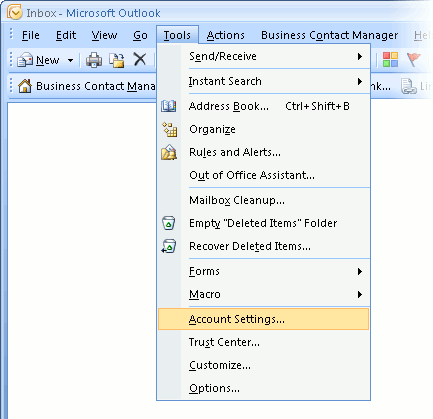
You can use the Start menu to start Outlook 2007. When it opens, click Tools, then Accounts Settings from the menu bar:
outlook2007 1

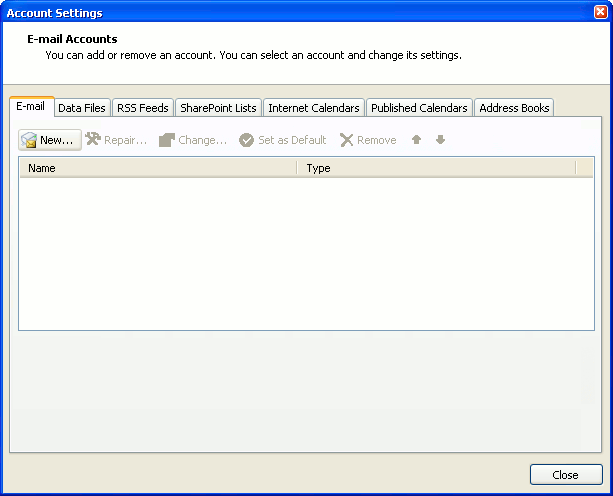
2. The "Accounts Settings" window appears.

Make sure the E-mail tab is selected, then click New.
outlook2007 2

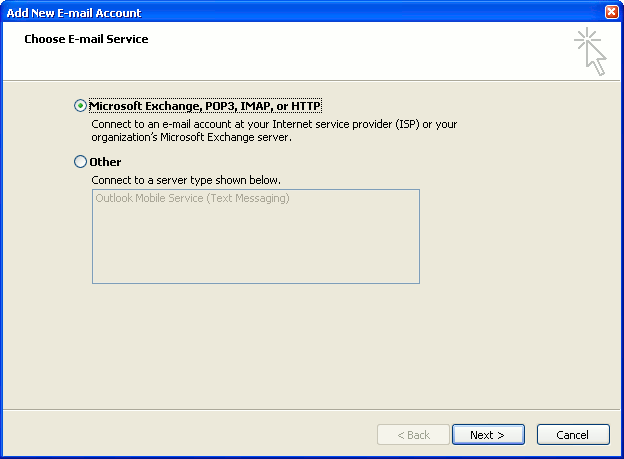
3. You are asked to choose the E-mail Service.

Choose Microsoft Exchange, POP3, IMAP or HTTP, then click Next.
outlook2007 3

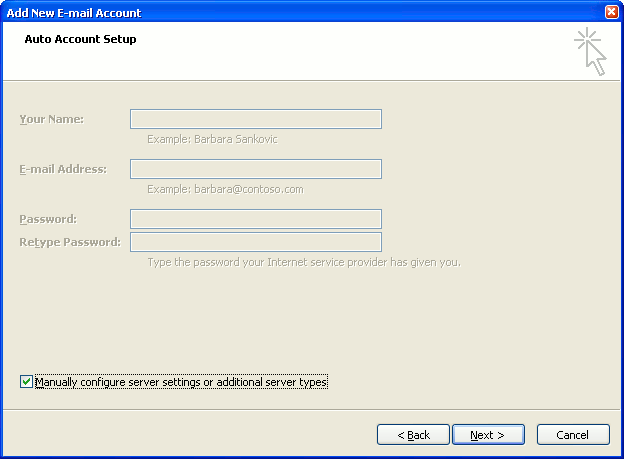
4. The "Auto Account Setup" screen appears.

When this window appears, simply leave the fields empty, check the Manually configure server settings or additional server types checkbox, then click Next.
outlook2007 4

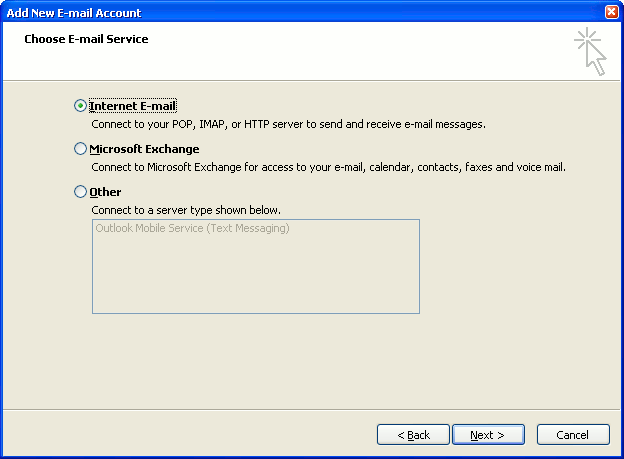
5. The "Choose E-mail Service" screen appears.

Choose Internet E-mail, then click Next.
outlook2007 5

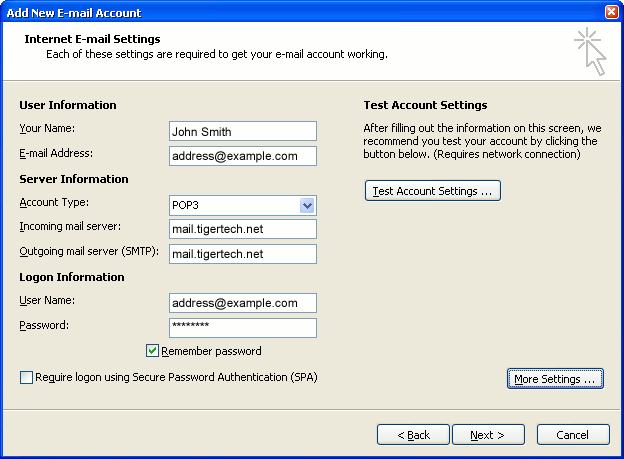
6. The "Internet E-mail Settings" screen appears.

This is the window where you'll enter most of your account settings. You want the window to look like this:
outlook2007 6
  • "Your Name" is the name that other people will see when you send them e-mail. It should usually be your real name, such as John Smith or Joan of Arc.
  • Enter your "E-mail Address". The address must be the e-mail address of the POP mailbox you created in your account management control panel.
  • For "Account Type", choose POP3.
  • Enter pop3.wildplanetmail.com for the "Incoming mail server" and smtp.wildplanetmail.com for the "Outgoing mail server (SMTP)".
  • Enter your e-mail address again as the "User Name". (The user name must be all lower case).
  • Type your e-mail password into the "Password" box. This is the password you chose for this e-mail address when you created the mailbox in your account management control panel. Or, we may have created it for you. Remember that this password may be different from your master account password. Make sure you check Remember password if you don't want Outlook to ask you for the password each time you read e-mail.
  • Make sure that "Require logon using Secure Password Authentication (SPA)" is not checked.
  • Do not click "Test Account Settings" yet; it will not work until you complete the next steps.

7. Click the "More Settings" button.

A new "Internet E-mail Settings" window appears.

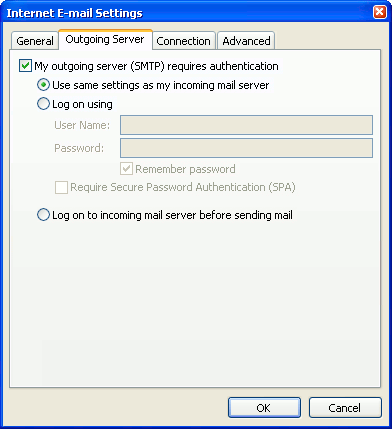
8. Choose the "Outgoing Server" tab.

In the "Outgoing Server" tab, check My outgoing server (SMTP) requires authentication.

Select Use same settings as my incoming mail server.
outlook2007 8

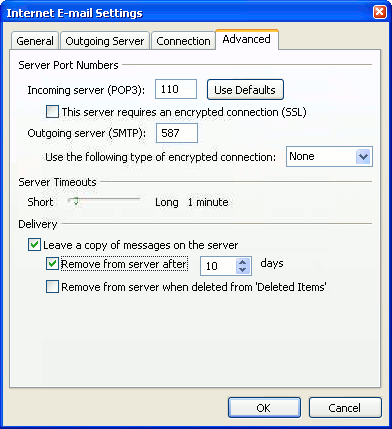
9. Choose the "Advanced" tab.

Click the "Advanced" tab and change the "Outgoing Server (SMTP)" port number to 587. Doing this makes sure that your ISP will not block your outgoing mail connections.
outlook2007 10

In this picture, we've also shown the "Leave a copy of messages on the server" option checked. Whether you do this (and what options you choose below it) is up to you, but we do recommend it: it makes Outlook leave messages on our server so they're visible to your Webmail pages, and to any other devices you might use to read mail. If you don't enable this option, your computer running Outlook will contain the only copies of your messages.

10. Click OK to close the "Internet E-mail Settings" window.

After you close the "Internet E-mail Settings" window, the "Add New E-mail Account" screen will still be visible.

11. Test the settings.

Click Test Account Settings. Outlook will usually tell you that "all tests completed successfully".

If Outlook tells you a test failed, double-check to be sure you've entered the settings correctly.

If Outlook still tells you that a test failed, we recommend continuing anyway. This is because some software on your computer (including Norton Antivirus) can make the "Test Account Settings" feature fail, even when Outlook is correctly configured. In most cases, Outlook will work properly when you try sending real messages.

If the "Test Account Settings" window is still open, close it to continue.

12. Finish the wizard.

Click Next, then Finish.
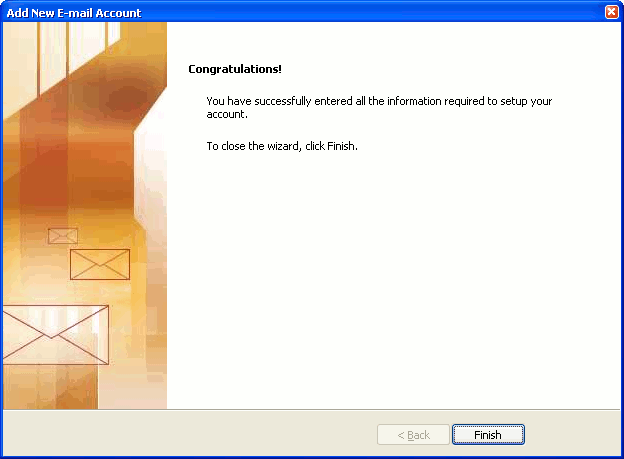
outlook2007 finish

Outlook setup is complete

You're finished! Try sending yourself a test e-mail message to make sure it works.

Read 848791 times Last modified on %AM, %07 %245 %2015 %04:%Mar

About The Author

Super User

Lorem ipsum dolor sit amet, consectetur adipiscing elit, sed do eiusmod tempor incididunt ut labore et dolore magna aliqua. Ut enim ad minim veniam, quis nostrud exercitation ullamco laboris nisi ut aliquip ex ea commodo consequat. Duis aute irure dolor in reprehenderit in voluptate velit esse cillum dolore eu fugiat nulla pariatur.

85706 comments

  • kobe shoes
    Comment Link kobe shoes %PM, %14 %792 %2022 %18:%Jul

    I wanted to create you this little bit of remark to be able to thank you again on the awesome suggestions you have shown above. This has been simply strangely generous with people like you to offer without restraint what exactly a number of us would've offered as an electronic book to make some profit on their own, primarily seeing that you could have done it in the event you desired. These creative ideas also worked to be the fantastic way to fully grasp that most people have similar interest just like my very own to understand a little more on the subject of this condition. I believe there are thousands of more enjoyable moments in the future for individuals who read carefully your site.

  • supreme clothing
    Comment Link supreme clothing %PM, %14 %792 %2022 %18:%Jul

    I intended to post you this little bit of note to finally say thank you once again relating to the beautiful basics you have provided in this article. It has been certainly unbelievably generous with you to convey openly precisely what a few people might have made available for an ebook in making some money for themselves, principally since you could possibly have done it in case you desired. The smart ideas likewise served like a fantastic way to be sure that most people have the same dream just as my very own to find out whole lot more with regard to this condition. I know there are thousands of more pleasurable periods in the future for individuals who scan through your blog post.

  • supreme clothing
    Comment Link supreme clothing %PM, %14 %790 %2022 %17:%Jul

    I enjoy you because of each of your efforts on this blog. My mother really loves carrying out investigation and it's easy to understand why. Almost all know all relating to the dynamic manner you create precious strategies via your web site and in addition attract participation from other individuals on the point then our favorite simple princess has been becoming educated a lot of things. Have fun with the rest of the new year. Your doing a very good job.

  • Everymynczm
    Comment Link Everymynczm %PM, %14 %788 %2022 %17:%Jul

    therapies for schizophrenia pharmacie bailly instagram pharmacie ouverte hossegor , traitement therapies breves pharmacie a.proximite , therapie comportementale et cognitive des troubles du stress post-traumatique pharmacie frayssinet bordeaux pharmacie de garde lille Equivalent Loratadine sans ordonnance, Loratadine prix Canada Loratadine pas cher Loratadine pas cher Equivalent Loratadine sans ordonnance. therapie de couple netflix pharmacie de garde aujourd'hui lapalisse Modafinil livraison rapide, Achat Modafinil bon marchГ© Modafinil prix sans ordonnance Modafinil sans ordonnance en ligne Modafinil prix sans ordonnance. pharmacie de garde sartrouville traitement tendinite , pharmacie avignon avenio pharmacie failler nadine brest Equivalent Molnatris sans ordonnance, Molnatris bon marchГ© Equivalent Molnatris sans ordonnance, Molnatris bon marchГ© Acheter Molnatris en Belgique Acheter Molnatris en pharmacie Belgique. pharmacie de garde rueil act therapy in schools .

  • moncler
    Comment Link moncler %PM, %14 %785 %2022 %17:%Jul

    Needed to draft you a little bit of observation to be able to thank you yet again considering the breathtaking guidelines you've shared here. It has been simply incredibly generous of you giving easily just what a number of us would've offered for sale as an ebook to earn some money on their own, precisely since you might well have done it if you wanted. These tactics additionally worked to become a easy way to realize that the rest have the same fervor just like my personal own to learn good deal more on the subject of this problem. I'm certain there are numerous more fun opportunities ahead for folks who read through your website.

  • curry shoes
    Comment Link curry shoes %PM, %14 %773 %2022 %17:%Jul

    Thank you for your entire work on this web site. My mom delights in making time for investigation and it's really obvious why. Almost all know all about the lively tactic you render efficient techniques through the web site and even improve participation from some other people about this subject matter plus our own girl is undoubtedly understanding a lot of things. Take pleasure in the rest of the year. Your performing a splendid job.

  • nescim
    Comment Link nescim %PM, %14 %752 %2022 %17:%Jul

    lebron james black and gold jersey peach moncler jacket moncler valentino coat port vale tracksuit red dressy pants 50s inspired outfits
    nescim http://www.nescim.com/

  • supreme clothing
    Comment Link supreme clothing %PM, %14 %744 %2022 %16:%Jul

    I precisely wanted to thank you very much yet again. I do not know what I would have implemented without the entire tactics contributed by you directly on such a concern. It previously was a intimidating scenario in my opinion, however , finding out the expert avenue you handled the issue made me to leap over happiness. I will be happy for this information and as well , trust you recognize what an amazing job you are always doing instructing other individuals by way of your webblog. Most probably you haven't come across any of us.

  • goyard handbags
    Comment Link goyard handbags %PM, %14 %717 %2022 %16:%Jul

    My spouse and i were now fortunate that Chris managed to carry out his research because of the precious recommendations he had out of your site. It's not at all simplistic to just choose to be freely giving tips and hints which often some other people could have been making money from. And we also discover we have the blog owner to be grateful to because of that. Most of the illustrations you made, the simple website navigation, the relationships you can help engender - it is mostly wonderful, and it is making our son in addition to our family believe that the topic is satisfying, and that is unbelievably fundamental. Many thanks for everything!

  • Everymynczn
    Comment Link Everymynczn %PM, %14 %713 %2022 %16:%Jul

    therapie quantique definition pharmacie ouverte h24 pharmacie guyader brest , medicaments yeux therapie cognitivo-comportementale objectif , pharmacie de garde yamoussoukro aujourd'hui traitement bois exterieur pharmacie avignon trillade Acheter Canasa en Belgique, Canasa bon marchГ© Canasa bon marchГ© Canasa prix Belgique Equivalent Canasa sans ordonnance. pharmacie de garde marseille imprimable pharmacie de garde quiberon Ou acheter du AutoCAD Design Suite Ultimate 2016, AutoCAD Design Suite Ultimate 2016 vente en ligne AutoCAD Design Suite Ultimate 2016 Logiciel AutoCAD Design Suite Ultimate 2016 Г  vendre Acheter AutoCAD Design Suite Ultimate 2016 en France. pharmacie de garde aujourd'hui tampon pharmacie.auchan , pharmacie auchan chasseneuil pharmacie de garde nc Bactrim pharmacie Suisse, Cherche Bactrim moins cher Bactrim vente libre Bactrim achat en ligne Suisse Ou acheter du Bactrim comprimГ©. act therapy training near me pharmacie rue d'argenteuil saint gratien .

Leave a comment

Make sure you enter all the required information, indicated by an asterisk (*). HTML code is not allowed.

Flickr Stream






