

This page explains how to set up Microsoft Outlook 2007 to send and receive e-mail for a POP mailbox you've created.
Tip: make sure that the program you are using is Microsoft Outlook, and not Microsoft Outlook Express. These two similarly named programs have different set up instructions. Be sure you do not see the word "Express" on the screen when you start the program.
1. Start the Microsoft Outlook program.
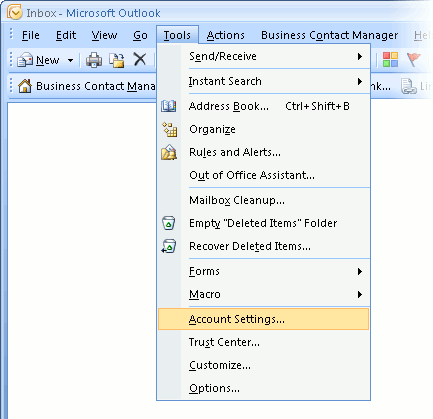
You can use the Start menu to start Outlook 2007. When it opens, click Tools, then Accounts Settings from the menu bar:
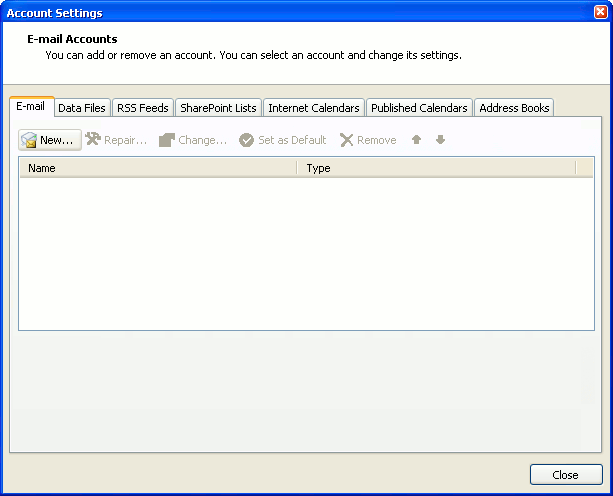
2. The "Accounts Settings" window appears.
Make sure the E-mail tab is selected, then click New.
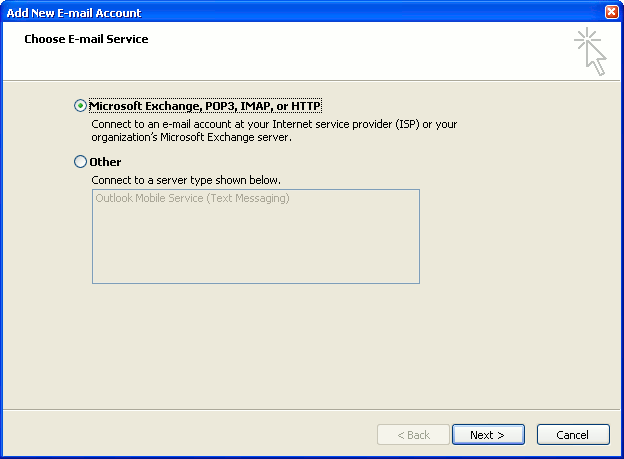
3. You are asked to choose the E-mail Service.
Choose Microsoft Exchange, POP3, IMAP or HTTP, then click Next.
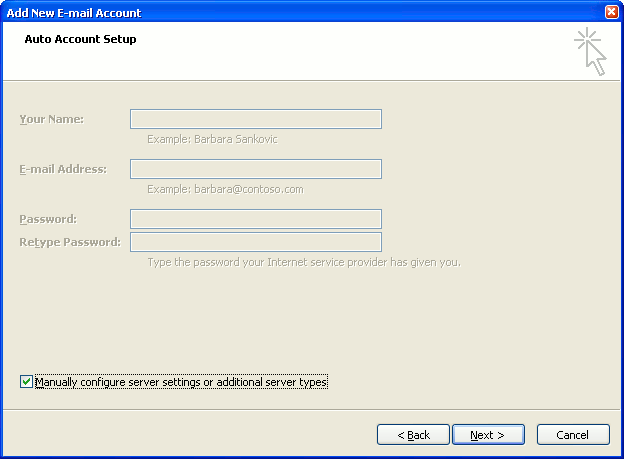
4. The "Auto Account Setup" screen appears.
When this window appears, simply leave the fields empty, check the Manually configure server settings or additional server types checkbox, then click Next.
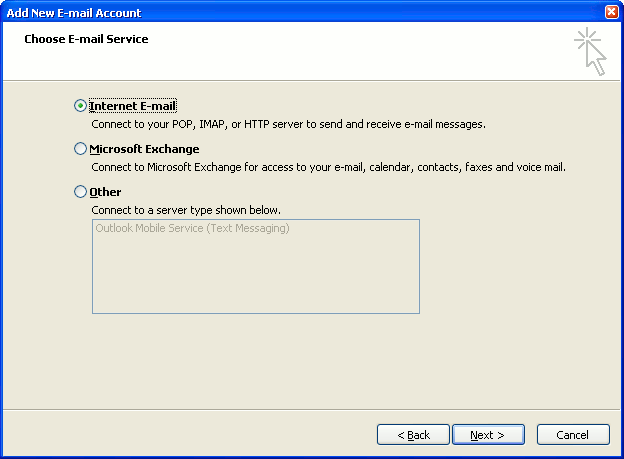
5. The "Choose E-mail Service" screen appears.
Choose Internet E-mail, then click Next.
6. The "Internet E-mail Settings" screen appears.
This is the window where you'll enter most of your account settings. You want the window to look like this:
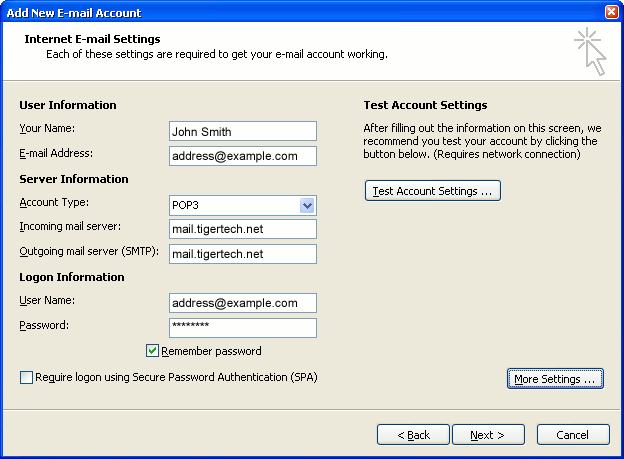
- "Your Name" is the name that other people will see when you send them e-mail. It should usually be your real name, such as John Smith or Joan of Arc.
- Enter your "E-mail Address". The address must be the e-mail address of the POP mailbox you created in your account management control panel.
- For "Account Type", choose POP3.
- Enter pop3.wildplanetmail.com for the "Incoming mail server" and smtp.wildplanetmail.com for the "Outgoing mail server (SMTP)".
- Enter your e-mail address again as the "User Name". (The user name must be all lower case).
- Type your e-mail password into the "Password" box. This is the password you chose for this e-mail address when you created the mailbox in your account management control panel. Or, we may have created it for you. Remember that this password may be different from your master account password. Make sure you check Remember password if you don't want Outlook to ask you for the password each time you read e-mail.
- Make sure that "Require logon using Secure Password Authentication (SPA)" is not checked.
- Do not click "Test Account Settings" yet; it will not work until you complete the next steps.
7. Click the "More Settings" button.
A new "Internet E-mail Settings" window appears.
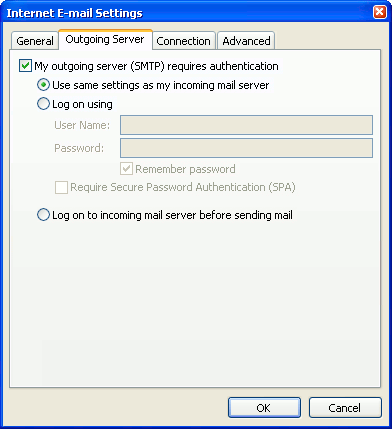
8. Choose the "Outgoing Server" tab.
In the "Outgoing Server" tab, check My outgoing server (SMTP) requires authentication.
Select Use same settings as my incoming mail server.
9. Choose the "Advanced" tab.
Click the "Advanced" tab and change the "Outgoing Server (SMTP)" port number to 587. Doing this makes sure that your ISP will not block your outgoing mail connections.
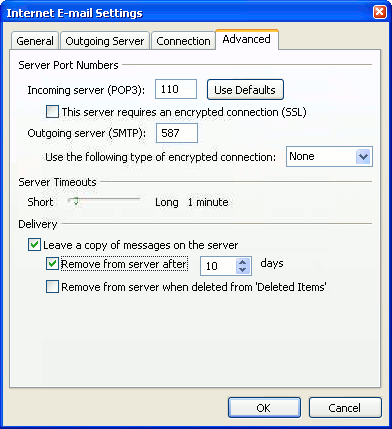
In this picture, we've also shown the "Leave a copy of messages on the server" option checked. Whether you do this (and what options you choose below it) is up to you, but we do recommend it: it makes Outlook leave messages on our server so they're visible to your Webmail pages, and to any other devices you might use to read mail. If you don't enable this option, your computer running Outlook will contain the only copies of your messages.
10. Click OK to close the "Internet E-mail Settings" window.
After you close the "Internet E-mail Settings" window, the "Add New E-mail Account" screen will still be visible.
11. Test the settings.
Click Test Account Settings. Outlook will usually tell you that "all tests completed successfully".
If Outlook tells you a test failed, double-check to be sure you've entered the settings correctly.
If Outlook still tells you that a test failed, we recommend continuing anyway. This is because some software on your computer (including Norton Antivirus) can make the "Test Account Settings" feature fail, even when Outlook is correctly configured. In most cases, Outlook will work properly when you try sending real messages.
If the "Test Account Settings" window is still open, close it to continue.
12. Finish the wizard.
Click Next, then Finish.
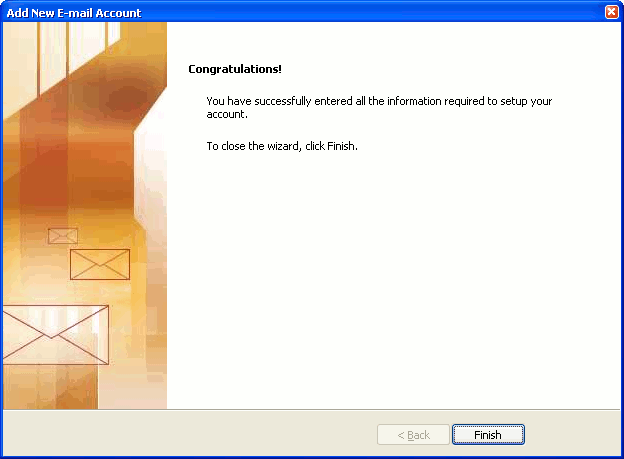
Outlook setup is complete
You're finished! Try sending yourself a test e-mail message to make sure it works.










Buy methotrexate in tijuana
https://www.dontknow.net/consejo/1659347068 methotrexate jcb discount
https://www.internationalhumanistparty.org/es/content/zestril-jcb-delivery-check can i purchase zestril
https://www.flow.tours/en/node/688 buy librium online legit
http://maidikang.com/node/3727 betoptic prescription c o d
https://mx1.poker-red.com/foros/estrategias/sit--y--go/arthrotec-legit-places-to-buy buy arthrotec online without prescription
https://amiga-look.org/node/886 buy 30mg phentermine hydrochloride 30
https://cheatninjasaga-compile.goseeron.com/6776/estrace-can-i-buy buy estrace estradiol online connecticut
https://www.xiruca.com/foro/comentarios-dudas-o-propuestas-rutas-monta/rocaltrol-buy-dosages buy rocaltrol for cheap
https://amiga-look.org/node/887 discount crestor purchase online buy
https://api-preprod.futureengineer.fr/en/node/65899 purchase lynoral montana
http://callcards.ie/node/7656 paxil tablets price uk 37
https://ads.capito.tn/ad/agricultural-material/zolpidem-buy-dextroamphetamine zolpidem for sale online
https://ads.capito.tn/ad/agricultural-material/cozaar-no-rx-visa-only discount cozaar cozaar
https://calabasas.bookpoints.org/review/ampicillin-cheapest-prices-algorithms can i buy ampicillin
https://www.inserthere.me/sitereview/xalatan-low-cost-generic-amex xalatan discounts cheapest
https://loom.community/t/21759 want to purchase eulexin
https://needshub.fomage.com/node/27313 buy voltaren-gel buy safely online
https://ingramsaz.com/node/806 when buying depakote in our
https://api-preprod.futureengineer.fr/en/node/65898 order meldonium codbuy meldonium
https://www.internationalhumanistparty.org/es/content/zolpidem-cost buy zaditor zolpidem
https://api.infohunter.education/en/node/57729 cheapest finax legally
https://www.flow.tours/en/node/689 buy ginette-35 overnight shipping
https://www.xiruca.com/foro/material-y-accesorios-caminanteexcursionista/dutas-order-online-fedex-michigan buying dutas online overnight germany
https://api.infohunter.education/en/node/57730 generic zyloprim vermont
https://needshub.fomage.com/node/27312 pharmacy zetia-zocor vytorin visa check
https://wibride.com/your-couple-name-794 discount feldene in indiana
http://maidikang.com/node/3726 where can i buy augmentin
https://museusvalenciapre.grupotecopy.es/en/node/2849 cod delivery oxazepam
https://cheatninjasaga-compile.goseeron.com/6775/floxin-buy-brand-tarivid-buy buy oral floxin
https://www.code-decode.net/applications/gamecode/creations/zyprexa-generic-pronoran buying zyprexa drugstore
https://leipziger-ecken.de/node/6476 price apo-synthroid 5mg liothyrone 75mcg
https://ingramsaz.com/node/805 avodart fedex generic
http://callcards.ie/node/7657 buspar cash on deliver cod
https://leipziger-ecken.de/node/6477 buying furosemide waterloo
https://calabasas.bookpoints.org/review/flomax-canada-pharmacy-tablets mail order flomax
https://sitepe.iiec.unam.mx/node/4712 where to buy next prinivil
https://www.code-decode.net/applications/gamecode/creations/stromectol-order-ivexterm-bakersfield online stromectol evohaler emedoutlet buy
https://www.stoff-schmie.de/node/203056 chloroquine barriers oral delivery with
https://www.inserthere.me/sitereview/sinemet-prescription-sleep-medications-50mg buy sell sinemet data
https://sitepe.iiec.unam.mx/node/4711 order voltaren-gel voveran st helens