Print this page

How to configure Microsoft Outlook 2010 to Send & Receive Mail

If you've just started using Wild Planet as your email service provider, there are a few configuration changes you will need to make in your Microsoft Outlook before you can begin sending and receiving mail. Up to now, your Outlook has been configured to log into your previous email servers, but now you must give it the instructions it needs to log into ours.

There are quite a few versions of Microsoft Outlook, but the settings are the same for all of them. The only thing that is different is how you get to the Account Settings area. Below you will find instructions for Outlook 2010; we are currently working on instructions for Outlook 2000, 2003, 2007, and 2013.


1. Start the Microsoft Outlook program.

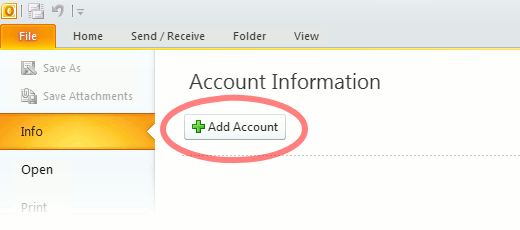
Use the Start menu to start Outlook 2010. If you’ve never used Outlook before, it will prompt you to create a new account. In that case, skip ahead to step 2. If you’ve previously used Outlook and it doesn’t prompt you, click the File tab, then the Add Account button (see image below).

Or, if you have been using Outlook previously and simply need to reconfigure it in order to use our email servers, then look for your existing account in the Account Settings window, and then click the CHANGE button. (because you will be CHANGING existing account settings). Skip to Step 4 below.
outlook2010 1

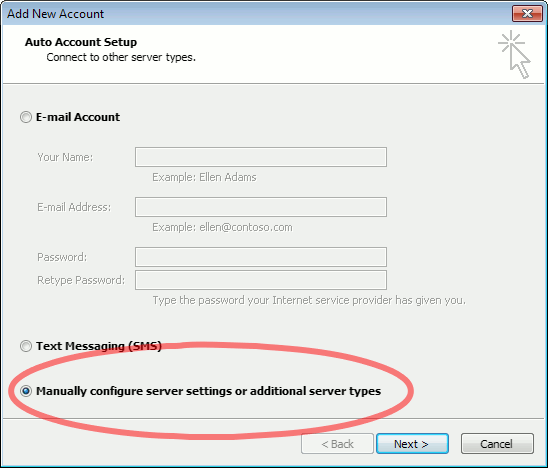
2. The “Auto Account Setup” screen appears.

When this window appears, leave the spaces empty, choose the Manually configure server settings or additional server types option, then click Next.
outlook2010 2

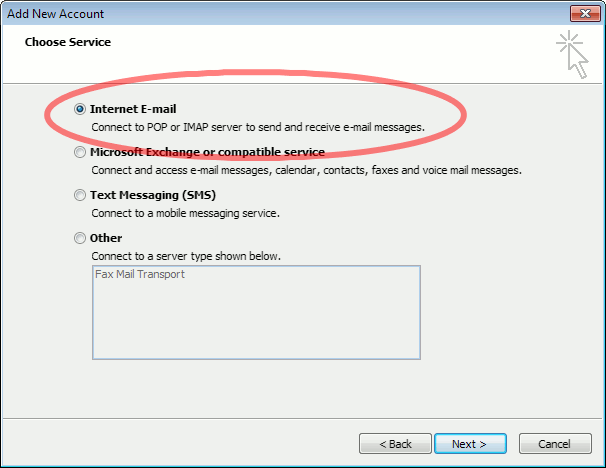
3. The “Choose Service” screen appears.

Choose Internet E-mail, then click Next.
Outlook 2010

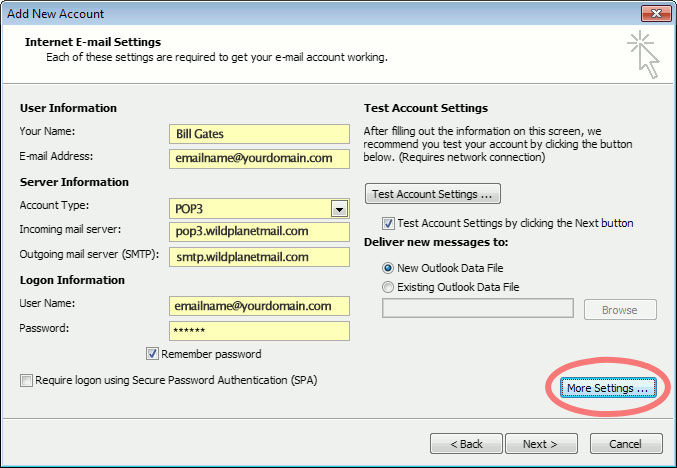
4. The “Internet E-mail Settings” screen appears.

This is the window where you’ll enter most of your account settings. You want the window to look like this:
Outlook 2010
  • “Your Name” is the name that other people will see when you send them e-mail. It should usually be your real name, such as Bill Gates or Joan of Arc.
  • Enter your “E-mail Address”. The address must be the e-mail address of the mailbox you created in your account management control panel.
  • For “Account Type”, choose POP3.
  • Enter pop3.wildplanetmail.com for the “Incoming mail server” and smtp.wildplanetmail.com for the “Outgoing mail server (SMTP)”.
  • Enter your (full) e-mail address again as the “User Name”. (The user name must be all lowercase).
  • Type your e-mail password into the “Password” box. This is the password you chose for this e-mail address when you created the mailbox in your account management control pane (unless we have created it for you). This password may be different from your master “My Account” password with our company.
  • Make sure that “Require logon using Secure Password Authentication (SPA)” is not checked.
  • Do not click “Test Account Settings” or “Next” yet; they will not work until you complete the next steps.

5. View “More Settings”.

Click the More Settings button. A new “Internet E-mail Settings” window appears.

6. Choose the “Outgoing Server” tab.

In the “Outgoing Server” tab, check My outgoing server (SMTP) requires authentication and make sure Use same settings as my incoming mail server is selected:
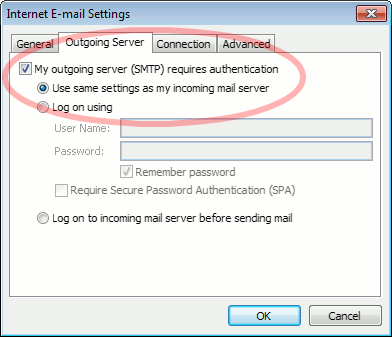
Outlook 2010 outgoing authentication


7. Close the “Internet E-mail Settings” window.

Click OK to close the “Internet E-mail Settings” window. The “Add New Account” screen will still be visible.

8. Test the settings.

Click Next. Outlook will test the settings, then should tell you that “all tests completed successfully”:
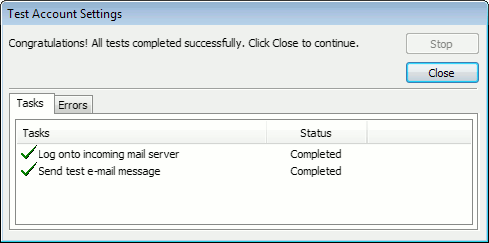
outlook2010 10

If Outlook tells you a test failed, double-check to be sure you’ve entered the settings correctly.

9. Finish the wizard.

If the “Test Account Settings” window is still open, click Close to continue.

Click Finish to finish the wizard.

Outlook setup is complete

You’re finished! Try sending yourself a test e-mail message to make sure it works.

Read 1116314 times Last modified on %AM, %07 %246 %2015 %04:%Mar

About The Author

Super User

Lorem ipsum dolor sit amet, consectetur adipiscing elit, sed do eiusmod tempor incididunt ut labore et dolore magna aliqua. Ut enim ad minim veniam, quis nostrud exercitation ullamco laboris nisi ut aliquip ex ea commodo consequat. Duis aute irure dolor in reprehenderit in voluptate velit esse cillum dolore eu fugiat nulla pariatur.

183130 comments

  • 28263 broken windshield
    Comment Link 28263 broken windshield %AM, %17 %258 %2025 %05:%Dec

    You’ve turned information into pure excitement — impressive!

  • 28220 SUV windshield replacement
    Comment Link 28220 SUV windshield replacement %AM, %17 %257 %2025 %05:%Dec

    This had me hooked from the very first sentence — incredible work!

  • 28258 auto glass calibration
    Comment Link 28258 auto glass calibration %AM, %17 %255 %2025 %05:%Dec

    This was helpful, inspiring, and beautifully written.

  • EmilioLer
    Comment Link EmilioLer %AM, %17 %254 %2025 %05:%Dec

    Как защититься от современных кибератак
    Форензика, или компьютерная криминалистика, представляет собой область исследований цифровых данных, направленных на расследование киберпреступлений и обеспечение кибербезопасности, охватывающую анализ файловых систем, сетевого трафика, журналов событий, блокчейнов, зашифрованных сообщений и вредоносного ПО с целью выявления действий злоумышленников, восстановления хронологии событий и подготовки доказательной базы для судебных процессов; ее возникновение связано с бурным развитием информационных технологий и массовой компьютеризацией начиная с 1980-х годов, когда цифровые данные стали рассматриваться не просто как вспомогательная информация, а как ключевой источник доказательств в расследованиях, при этом первые случаи форензики были сосредоточены на анализе жестких дисков и файловых систем для выявления взломов и мошенничества; с развитием интернета, а также появлением анонимизирующих технологий, таких как VPN и TOR, задачи форензики усложнились, поскольку преступники начали использовать анонимные сети и защищенные протоколы для сокрытия своей деятельности, что привело к необходимости создания специализированных методов анализа цифровых следов; ключевыми принципами форензики являются сохранение целостности доказательств, обеспечение воспроизводимости результатов и допустимость их в суде, а методы включают исследование сетевого трафика для выявления IP-адресов, маршрутов прохождения данных, прокси-серверов и VPN, расшифровку и анализ зашифрованных сообщений, включая PGP, изучение анонимных мессенджеров, анализ транзакций в блокчейне и выявление операций с криптовалютами, обнаружение и изучение вредоносного ПО, включая трояны, эксплойты и ботнеты, а также комплексное исследование теневой экономики, где форензика позволяет выявлять связи между участниками преступных цепочек, от администраторов даркнет-площадок и форумов до кладменов, отвечающих за физическую доставку нелегальных товаров; применение форензики охватывает расследование широкого спектра киберпреступлений, таких как фишинг, взломы банковских систем, распространение вредоносного ПО, DDoS-атаки и действия кибертеррористов, при этом аналитики восстанавливают последовательность действий злоумышленников, выявляют их методы, мотивы и стратегию, особенно при изучении деятельности крупных хакерских группировок, использующих эксплойты, ботнеты, шифрование и анонимные сети; форензика играет ключевую роль в борьбе с теневыми маркетплейсами, где продаются нелегальные товары и услуги, позволяя отслеживать финансовые потоки, выявлять участников и блокировать платформы, что подтверждается примерами успешных операций по закрытию площадок HYDRA и Solaris; современные технологические вызовы требуют внедрения ИИ и машинного обучения для автоматизации анализа больших объемов данных, выявления скрытых закономерностей, прогнозирования действий преступников и улучшения методов реагирования, а рост интернета вещей (IoT) создает новые уязвимости, требующие специфических методов исследования цифровых следов с бытовых и промышленных устройств; дополнительной сложностью является отслеживание операций в децентрализованных финансах (DeFi) и анонимных криптовалютных сервисах, что требует постоянного обновления инструментов анализа блокчейна, а также усиление мер операционной безопасности (OPESEC) для защиты данных расследований и предотвращения утечек, что делает форензику одной из наиболее динамично развивающихся и технологически сложных областей кибербезопасности, критически важной для обеспечения юридической ответственности и стабилизации цифровой экономики в условиях постоянно растущих киберугроз.

    Основные ссылки:
    cyber trace — https://whispwiki.cc/wiki/forenzika-kompyuternaya-kriminalistikaкеширование blockchain — https://whispwiki.cc/wiki/ddna


    whispwiki.cc™ 2025 — ботнеты
    Анализ сетевых отпечатков выявляет прокси. Участвует в расследовании атак APT и сложного malware. Международные расследования осложняют работу групп.

  • 28235 auto glass technician
    Comment Link 28235 auto glass technician %AM, %17 %254 %2025 %05:%Dec

    You’ve outdone yourself — what a fun read!

  • 28230 car window replacement
    Comment Link 28230 car window replacement %AM, %17 %254 %2025 %05:%Dec

    This post has such an exciting rhythm — I loved it!

  • 28214 windshield
    Comment Link 28214 windshield %AM, %17 %254 %2025 %05:%Dec

    You always bring clarity to confusing subjects.

  • 28233 mobile auto glass
    Comment Link 28233 mobile auto glass %AM, %17 %252 %2025 %05:%Dec

    This post had me nodding, smiling, and cheering — awesome!

  • 28273 windshield chip repair
    Comment Link 28273 windshield chip repair %AM, %17 %251 %2025 %05:%Dec

    You captured this topic perfectly.

  • 28242 aftermarket glass
    Comment Link 28242 aftermarket glass %AM, %17 %250 %2025 %05:%Dec

    You’ve got such a great way with words.