Print this page

How to configure Microsoft Outlook 2010 to Send & Receive Mail

If you've just started using Wild Planet as your email service provider, there are a few configuration changes you will need to make in your Microsoft Outlook before you can begin sending and receiving mail. Up to now, your Outlook has been configured to log into your previous email servers, but now you must give it the instructions it needs to log into ours.

There are quite a few versions of Microsoft Outlook, but the settings are the same for all of them. The only thing that is different is how you get to the Account Settings area. Below you will find instructions for Outlook 2010; we are currently working on instructions for Outlook 2000, 2003, 2007, and 2013.


1. Start the Microsoft Outlook program.

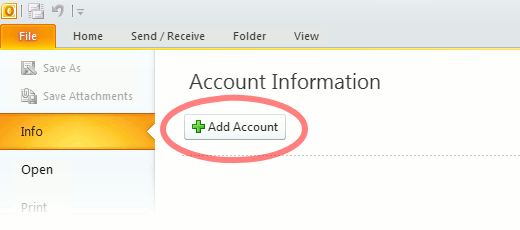
Use the Start menu to start Outlook 2010. If you’ve never used Outlook before, it will prompt you to create a new account. In that case, skip ahead to step 2. If you’ve previously used Outlook and it doesn’t prompt you, click the File tab, then the Add Account button (see image below).

Or, if you have been using Outlook previously and simply need to reconfigure it in order to use our email servers, then look for your existing account in the Account Settings window, and then click the CHANGE button. (because you will be CHANGING existing account settings). Skip to Step 4 below.
outlook2010 1

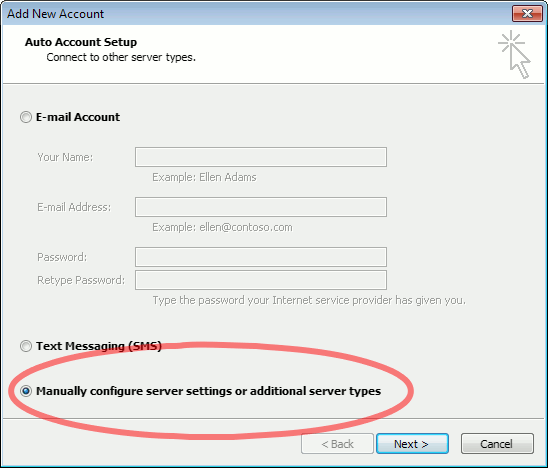
2. The “Auto Account Setup” screen appears.

When this window appears, leave the spaces empty, choose the Manually configure server settings or additional server types option, then click Next.
outlook2010 2

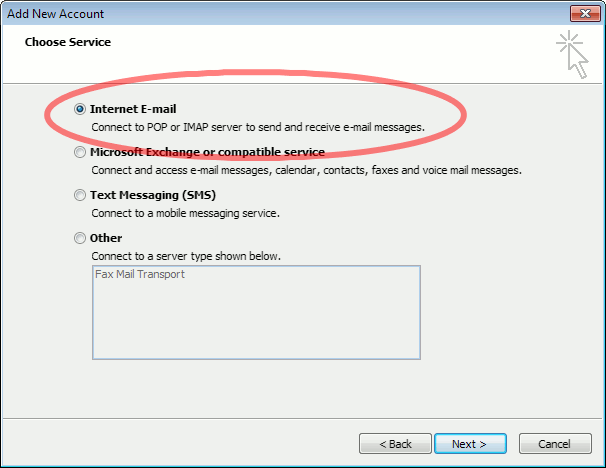
3. The “Choose Service” screen appears.

Choose Internet E-mail, then click Next.
Outlook 2010

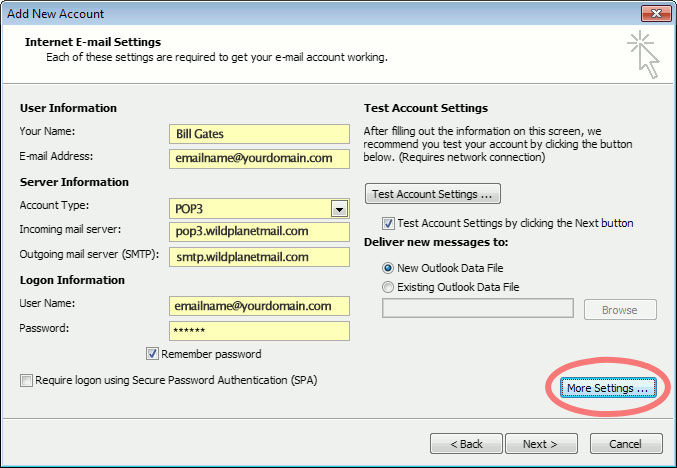
4. The “Internet E-mail Settings” screen appears.

This is the window where you’ll enter most of your account settings. You want the window to look like this:
Outlook 2010
  • “Your Name” is the name that other people will see when you send them e-mail. It should usually be your real name, such as Bill Gates or Joan of Arc.
  • Enter your “E-mail Address”. The address must be the e-mail address of the mailbox you created in your account management control panel.
  • For “Account Type”, choose POP3.
  • Enter pop3.wildplanetmail.com for the “Incoming mail server” and smtp.wildplanetmail.com for the “Outgoing mail server (SMTP)”.
  • Enter your (full) e-mail address again as the “User Name”. (The user name must be all lowercase).
  • Type your e-mail password into the “Password” box. This is the password you chose for this e-mail address when you created the mailbox in your account management control pane (unless we have created it for you). This password may be different from your master “My Account” password with our company.
  • Make sure that “Require logon using Secure Password Authentication (SPA)” is not checked.
  • Do not click “Test Account Settings” or “Next” yet; they will not work until you complete the next steps.

5. View “More Settings”.

Click the More Settings button. A new “Internet E-mail Settings” window appears.

6. Choose the “Outgoing Server” tab.

In the “Outgoing Server” tab, check My outgoing server (SMTP) requires authentication and make sure Use same settings as my incoming mail server is selected:
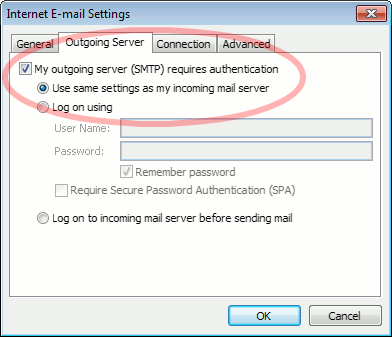
Outlook 2010 outgoing authentication


7. Close the “Internet E-mail Settings” window.

Click OK to close the “Internet E-mail Settings” window. The “Add New Account” screen will still be visible.

8. Test the settings.

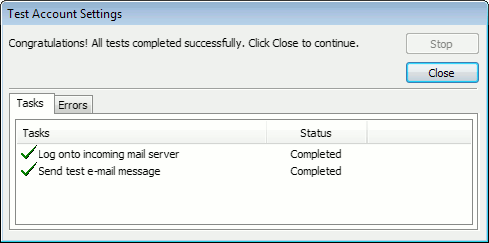
Click Next. Outlook will test the settings, then should tell you that “all tests completed successfully”:
outlook2010 10

If Outlook tells you a test failed, double-check to be sure you’ve entered the settings correctly.

9. Finish the wizard.

If the “Test Account Settings” window is still open, click Close to continue.

Click Finish to finish the wizard.

Outlook setup is complete

You’re finished! Try sending yourself a test e-mail message to make sure it works.

Read 1130461 times Last modified on %AM, %07 %246 %2015 %04:%Mar

About The Author

Super User

Lorem ipsum dolor sit amet, consectetur adipiscing elit, sed do eiusmod tempor incididunt ut labore et dolore magna aliqua. Ut enim ad minim veniam, quis nostrud exercitation ullamco laboris nisi ut aliquip ex ea commodo consequat. Duis aute irure dolor in reprehenderit in voluptate velit esse cillum dolore eu fugiat nulla pariatur.

183852 comments

  • golden goose sneakers
    Comment Link golden goose sneakers %PM, %11 %016 %2022 %23:%Apr

    I intended to write you that little word to help say thanks again for your pleasing solutions you've provided in this case. It has been quite strangely open-handed of you to offer without restraint what most of us might have offered as an ebook in making some money for their own end, certainly given that you might have tried it in the event you desired. The tactics likewise served as the good way to be certain that someone else have the identical desire similar to my own to learn more around this problem. I know there are many more fun times up front for individuals who look into your website.

  • hermes belt
    Comment Link hermes belt %PM, %11 %016 %2022 %23:%Apr

    Thank you so much for providing individuals with an extraordinarily splendid possiblity to check tips from here. It is usually so excellent and also stuffed with a great time for me and my office fellow workers to search your blog at minimum three times in a week to find out the fresh secrets you will have. And definitely, we are at all times astounded with the fabulous creative ideas you serve. Some two tips in this posting are unequivocally the most effective I have ever had.

  • birkin bag
    Comment Link birkin bag %PM, %11 %016 %2022 %23:%Apr

    I must express my thanks to the writer just for bailing me out of this type of scenario. Right after looking through the the web and obtaining methods which are not beneficial, I believed my entire life was gone. Existing devoid of the strategies to the issues you've solved as a result of your main report is a serious case, as well as the kind which may have badly damaged my career if I hadn't noticed the blog. Your primary know-how and kindness in dealing with all things was valuable. I am not sure what I would have done if I hadn't encountered such a point like this. It's possible to at this point relish my future. Thank you very much for this impressive and effective help. I won't hesitate to suggest the blog to anyone who would need tips about this situation.

  • jordan shoes
    Comment Link jordan shoes %PM, %11 %016 %2022 %23:%Apr

    I in addition to my buddies came analyzing the great advice on your web page and then the sudden got a terrible feeling I had not expressed respect to the web blog owner for those strategies. These boys were totally warmed to learn them and have now honestly been tapping into them. We appreciate you turning out to be very considerate as well as for deciding on this form of incredibly good information most people are really eager to be aware of. My sincere regret for not expressing gratitude to earlier.

  • kyrie irving shoes
    Comment Link kyrie irving shoes %PM, %11 %016 %2022 %23:%Apr

    I am just writing to make you understand of the excellent experience my daughter obtained going through your web page. She came to understand a lot of details, which include what it is like to have an amazing helping mindset to have the rest just master various hard to do things. You truly exceeded readers' expected results. Thank you for distributing these interesting, safe, revealing as well as cool tips on this topic to Lizeth.

  • lebron james shoes
    Comment Link lebron james shoes %PM, %11 %016 %2022 %23:%Apr

    I just wanted to post a brief word so as to express gratitude to you for all of the lovely tips and hints you are posting on this site. My extended internet investigation has at the end of the day been compensated with professional tips to share with my friends and classmates. I would say that many of us readers are extremely fortunate to be in a superb site with many outstanding professionals with valuable methods. I feel somewhat privileged to have used your entire web page and look forward to plenty of more enjoyable times reading here. Thanks a lot once again for everything.

  • jordans shoes
    Comment Link jordans shoes %PM, %11 %016 %2022 %23:%Apr

    Thank you so much for giving everyone a very brilliant opportunity to read critical reviews from this site. It's always very cool and as well , jam-packed with fun for me personally and my office acquaintances to search your blog really three times per week to find out the fresh secrets you have got. And lastly, we're at all times pleased with your unique suggestions you give. Certain two points in this post are easily the best I've ever had.

  • kyrie 7
    Comment Link kyrie 7 %PM, %11 %015 %2022 %23:%Apr

    I wanted to compose a comment to be able to say thanks to you for those precious information you are giving at this website. My long internet search has at the end been compensated with reliable strategies to talk about with my great friends. I 'd admit that many of us site visitors actually are very fortunate to exist in a decent network with so many awesome people with very beneficial hints. I feel pretty fortunate to have discovered your entire website page and look forward to some more exciting minutes reading here. Thank you once more for everything.

  • pg shoes
    Comment Link pg shoes %PM, %11 %014 %2022 %23:%Apr

    I am glad for writing to let you understand of the extraordinary experience my cousin's girl encountered reading through your webblog. She learned a lot of pieces, not to mention how it is like to possess a marvelous helping heart to have the mediocre ones quite simply know precisely selected impossible matters. You actually did more than visitors' expectations. Thanks for giving these valuable, healthy, edifying and as well as cool guidance on this topic to Gloria.

  • pg 1
    Comment Link pg 1 %PM, %11 %014 %2022 %23:%Apr

    I would like to point out my appreciation for your kindness for folks that really need help with this particular concept. Your real dedication to getting the message up and down ended up being certainly insightful and have specifically allowed folks just like me to attain their ambitions. Your entire warm and helpful guideline implies a great deal to me and especially to my colleagues. Best wishes; from everyone of us.