Print this page

How to configure Microsoft Outlook 2010 to Send & Receive Mail

If you've just started using Wild Planet as your email service provider, there are a few configuration changes you will need to make in your Microsoft Outlook before you can begin sending and receiving mail. Up to now, your Outlook has been configured to log into your previous email servers, but now you must give it the instructions it needs to log into ours.

There are quite a few versions of Microsoft Outlook, but the settings are the same for all of them. The only thing that is different is how you get to the Account Settings area. Below you will find instructions for Outlook 2010; we are currently working on instructions for Outlook 2000, 2003, 2007, and 2013.


1. Start the Microsoft Outlook program.

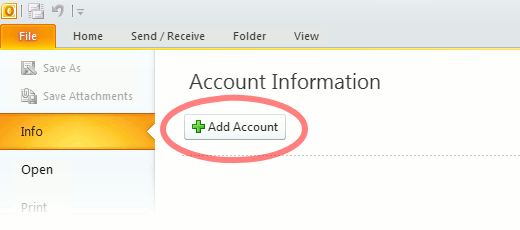
Use the Start menu to start Outlook 2010. If you’ve never used Outlook before, it will prompt you to create a new account. In that case, skip ahead to step 2. If you’ve previously used Outlook and it doesn’t prompt you, click the File tab, then the Add Account button (see image below).

Or, if you have been using Outlook previously and simply need to reconfigure it in order to use our email servers, then look for your existing account in the Account Settings window, and then click the CHANGE button. (because you will be CHANGING existing account settings). Skip to Step 4 below.
outlook2010 1

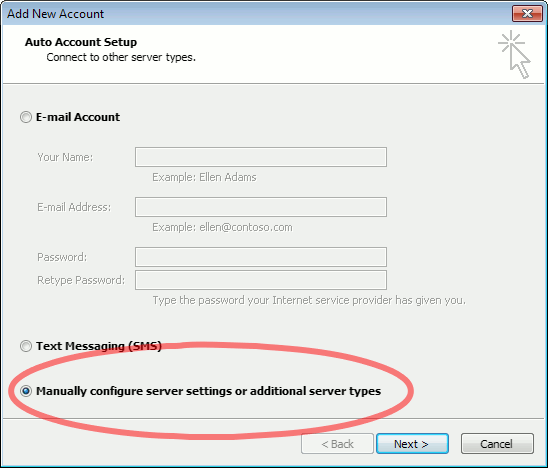
2. The “Auto Account Setup” screen appears.

When this window appears, leave the spaces empty, choose the Manually configure server settings or additional server types option, then click Next.
outlook2010 2

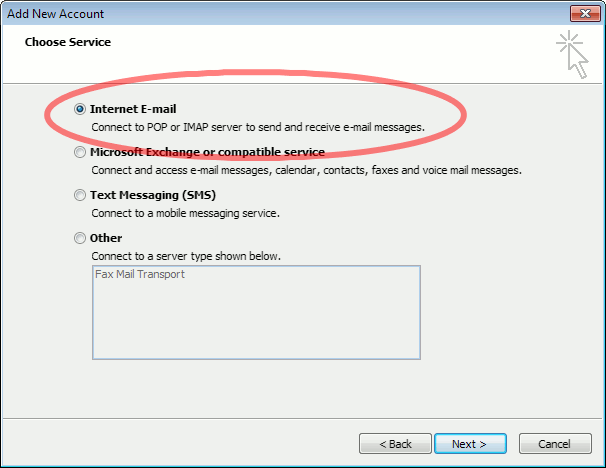
3. The “Choose Service” screen appears.

Choose Internet E-mail, then click Next.
Outlook 2010

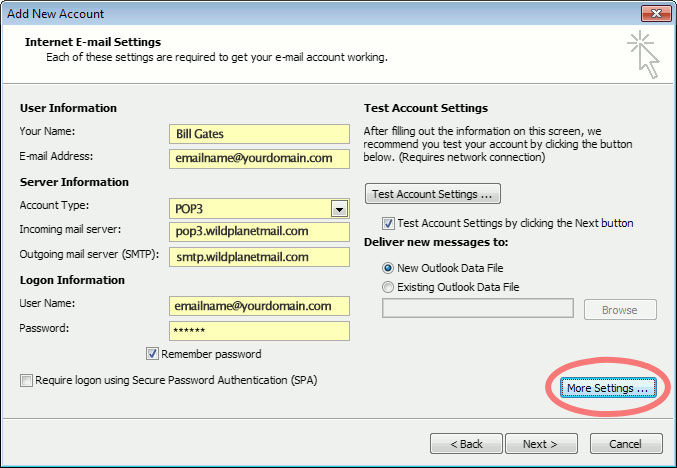
4. The “Internet E-mail Settings” screen appears.

This is the window where you’ll enter most of your account settings. You want the window to look like this:
Outlook 2010
  • “Your Name” is the name that other people will see when you send them e-mail. It should usually be your real name, such as Bill Gates or Joan of Arc.
  • Enter your “E-mail Address”. The address must be the e-mail address of the mailbox you created in your account management control panel.
  • For “Account Type”, choose POP3.
  • Enter pop3.wildplanetmail.com for the “Incoming mail server” and smtp.wildplanetmail.com for the “Outgoing mail server (SMTP)”.
  • Enter your (full) e-mail address again as the “User Name”. (The user name must be all lowercase).
  • Type your e-mail password into the “Password” box. This is the password you chose for this e-mail address when you created the mailbox in your account management control pane (unless we have created it for you). This password may be different from your master “My Account” password with our company.
  • Make sure that “Require logon using Secure Password Authentication (SPA)” is not checked.
  • Do not click “Test Account Settings” or “Next” yet; they will not work until you complete the next steps.

5. View “More Settings”.

Click the More Settings button. A new “Internet E-mail Settings” window appears.

6. Choose the “Outgoing Server” tab.

In the “Outgoing Server” tab, check My outgoing server (SMTP) requires authentication and make sure Use same settings as my incoming mail server is selected:
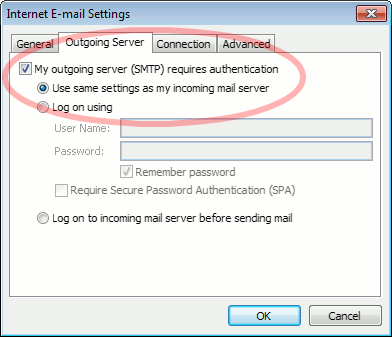
Outlook 2010 outgoing authentication


7. Close the “Internet E-mail Settings” window.

Click OK to close the “Internet E-mail Settings” window. The “Add New Account” screen will still be visible.

8. Test the settings.

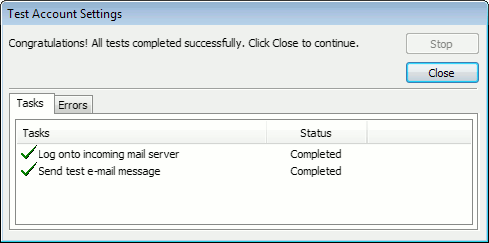
Click Next. Outlook will test the settings, then should tell you that “all tests completed successfully”:
outlook2010 10

If Outlook tells you a test failed, double-check to be sure you’ve entered the settings correctly.

9. Finish the wizard.

If the “Test Account Settings” window is still open, click Close to continue.

Click Finish to finish the wizard.

Outlook setup is complete

You’re finished! Try sending yourself a test e-mail message to make sure it works.

Read 1138318 times Last modified on %AM, %07 %246 %2015 %04:%Mar

About The Author

Super User

Lorem ipsum dolor sit amet, consectetur adipiscing elit, sed do eiusmod tempor incididunt ut labore et dolore magna aliqua. Ut enim ad minim veniam, quis nostrud exercitation ullamco laboris nisi ut aliquip ex ea commodo consequat. Duis aute irure dolor in reprehenderit in voluptate velit esse cillum dolore eu fugiat nulla pariatur.

184149 comments

  • yeezy
    Comment Link yeezy %PM, %13 %964 %2022 %22:%Apr

    I wanted to create you this tiny observation to give thanks once again over the pretty principles you have contributed on this page. It's certainly shockingly open-handed of people like you to offer extensively just what most of us could have made available as an e book to generate some profit for their own end, even more so since you might well have tried it if you considered necessary. Those ideas as well served to be the fantastic way to understand that some people have similar keenness the same as my very own to realize more related to this matter. I believe there are many more pleasant opportunities ahead for individuals who see your blog.

  • yeezy supply
    Comment Link yeezy supply %PM, %13 %963 %2022 %22:%Apr

    I together with my buddies have already been reading through the best points on your web blog and at once developed a terrible feeling I never thanked the blog owner for them. Those men became certainly very interested to study them and already have seriously been enjoying those things. I appreciate you for turning out to be quite thoughtful as well as for choosing some amazing themes millions of individuals are really wanting to be informed on. My personal sincere apologies for not saying thanks to sooner.

  • longchamp handbags
    Comment Link longchamp handbags %PM, %13 %962 %2022 %22:%Apr

    I would like to express some thanks to you just for bailing me out of this type of problem. As a result of looking out throughout the search engines and finding things which were not powerful, I thought my life was gone. Existing without the answers to the difficulties you have sorted out all through your entire blog post is a critical case, and the kind which might have in a negative way affected my entire career if I had not noticed your web site. The know-how and kindness in touching all the pieces was excellent. I'm not sure what I would have done if I hadn't encountered such a point like this. I'm able to now look forward to my future. Thanks very much for the specialized and sensible guide. I will not think twice to recommend your web site to any individual who will need guidelines about this matter.

  • giannis antetokounmpo shoes
    Comment Link giannis antetokounmpo shoes %PM, %13 %961 %2022 %22:%Apr

    I not to mention my pals appeared to be reading through the excellent recommendations located on your web blog and then at once I got a terrible feeling I had not thanked the web site owner for them. The boys happened to be consequently stimulated to study all of them and have in effect seriously been having fun with them. Appreciate your truly being so thoughtful and then for settling on variety of smart useful guides most people are really desperate to be informed on. My very own honest regret for not saying thanks to you sooner.

  • kyrie 7 shoes
    Comment Link kyrie 7 shoes %PM, %13 %961 %2022 %22:%Apr

    I enjoy you because of each of your effort on this website. My mum takes pleasure in doing investigation and it's easy to see why. Almost all notice all relating to the dynamic way you render effective guidance via your web site and as well increase contribution from other individuals on that concept while our daughter has always been discovering a whole lot. Take pleasure in the rest of the year. You're carrying out a really good job.

  • curry 8
    Comment Link curry 8 %PM, %13 %959 %2022 %22:%Apr

    Thanks for all your labor on this website. Debby really likes participating in investigations and it's really obvious why. A lot of people hear all relating to the compelling tactic you provide functional tactics through the website and as well boost participation from others on the topic then my girl is now being taught a lot of things. Have fun with the remaining portion of the new year. You have been performing a very good job.

  • supreme shirt
    Comment Link supreme shirt %PM, %13 %959 %2022 %22:%Apr

    I in addition to my friends have been reading the good tricks located on your web page and then got an awful feeling I had not expressed respect to the blog owner for them. My men became consequently thrilled to see them and now have sincerely been taking pleasure in these things. Thank you for indeed being so kind and then for considering this form of ideal resources most people are really eager to be aware of. My honest regret for not saying thanks to you sooner.

  • nike off white
    Comment Link nike off white %PM, %13 %959 %2022 %22:%Apr

    I needed to create you this very small note to say thank you once again on the wonderful tactics you've documented here. This has been quite remarkably open-handed with people like you to give publicly what exactly numerous people could have advertised for an ebook to make some dough for themselves, principally now that you might well have done it in the event you desired. The suggestions additionally worked like a fantastic way to fully grasp that most people have similar fervor just as my personal own to learn whole lot more in terms of this issue. I'm sure there are some more pleasurable moments up front for individuals who check out your site.

  • curry 7 shoes
    Comment Link curry 7 shoes %PM, %13 %959 %2022 %22:%Apr

    I definitely wanted to construct a message to thank you for those awesome solutions you are writing on this site. My considerable internet search has now been honored with professional facts to exchange with my close friends. I 'd assume that many of us readers actually are very much blessed to live in a very good place with many lovely individuals with insightful suggestions. I feel extremely lucky to have discovered your entire website and look forward to tons of more fun times reading here. Thanks a lot once more for everything.

  • goyard outlet
    Comment Link goyard outlet %PM, %13 %959 %2022 %22:%Apr

    I must convey my love for your generosity supporting those who absolutely need assistance with this important subject. Your personal dedication to getting the message throughout had become incredibly powerful and has always permitted workers just like me to reach their aims. This interesting information can mean a whole lot a person like me and much more to my office workers. Regards; from each one of us.