Print this page

How to configure Microsoft Outlook 2007 to Send & Receive Mail

This page explains how to set up Microsoft Outlook 2007 to send and receive e-mail for a POP mailbox you've created.

Tip: make sure that the program you are using is Microsoft Outlook, and not Microsoft Outlook Express. These two similarly named programs have different set up instructions. Be sure you do not see the word "Express" on the screen when you start the program.

1. Start the Microsoft Outlook program.

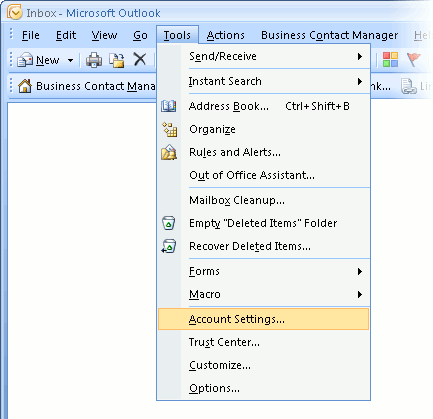
You can use the Start menu to start Outlook 2007. When it opens, click Tools, then Accounts Settings from the menu bar:
outlook2007 1

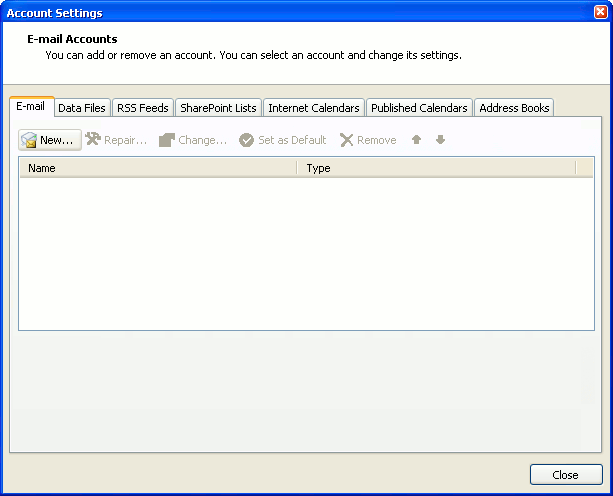
2. The "Accounts Settings" window appears.

Make sure the E-mail tab is selected, then click New.
outlook2007 2

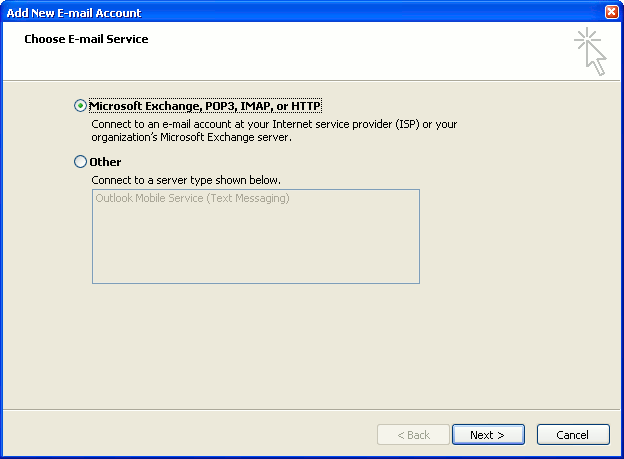
3. You are asked to choose the E-mail Service.

Choose Microsoft Exchange, POP3, IMAP or HTTP, then click Next.
outlook2007 3

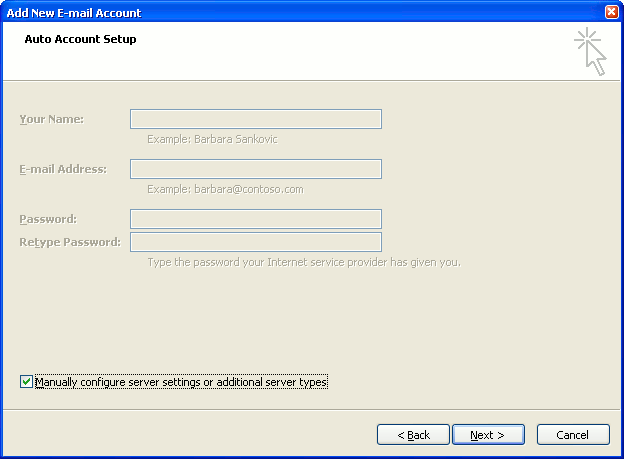
4. The "Auto Account Setup" screen appears.

When this window appears, simply leave the fields empty, check the Manually configure server settings or additional server types checkbox, then click Next.
outlook2007 4

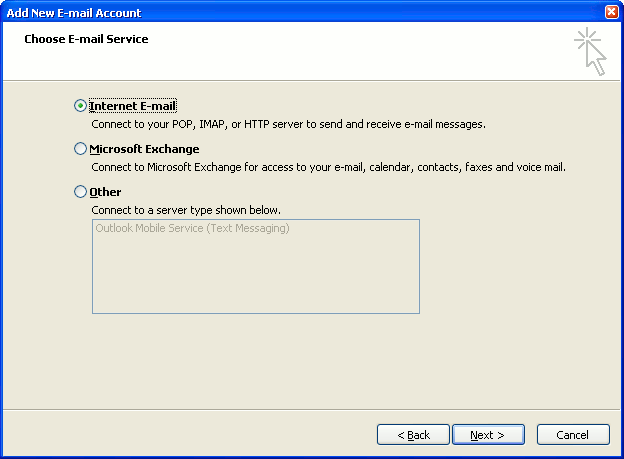
5. The "Choose E-mail Service" screen appears.

Choose Internet E-mail, then click Next.
outlook2007 5

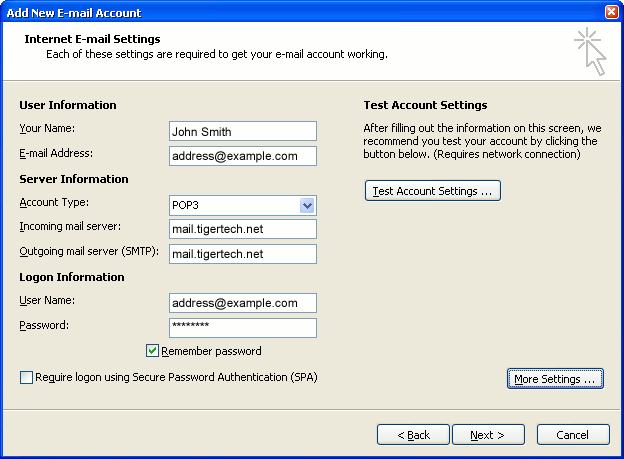
6. The "Internet E-mail Settings" screen appears.

This is the window where you'll enter most of your account settings. You want the window to look like this:
outlook2007 6
  • "Your Name" is the name that other people will see when you send them e-mail. It should usually be your real name, such as John Smith or Joan of Arc.
  • Enter your "E-mail Address". The address must be the e-mail address of the POP mailbox you created in your account management control panel.
  • For "Account Type", choose POP3.
  • Enter pop3.wildplanetmail.com for the "Incoming mail server" and smtp.wildplanetmail.com for the "Outgoing mail server (SMTP)".
  • Enter your e-mail address again as the "User Name". (The user name must be all lower case).
  • Type your e-mail password into the "Password" box. This is the password you chose for this e-mail address when you created the mailbox in your account management control panel. Or, we may have created it for you. Remember that this password may be different from your master account password. Make sure you check Remember password if you don't want Outlook to ask you for the password each time you read e-mail.
  • Make sure that "Require logon using Secure Password Authentication (SPA)" is not checked.
  • Do not click "Test Account Settings" yet; it will not work until you complete the next steps.

7. Click the "More Settings" button.

A new "Internet E-mail Settings" window appears.

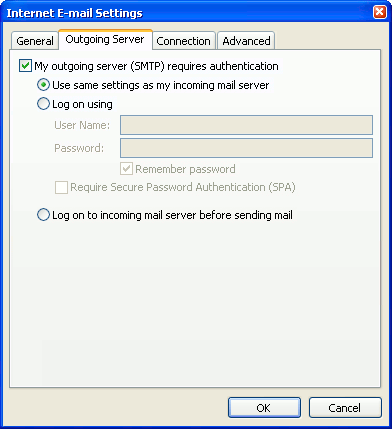
8. Choose the "Outgoing Server" tab.

In the "Outgoing Server" tab, check My outgoing server (SMTP) requires authentication.

Select Use same settings as my incoming mail server.
outlook2007 8

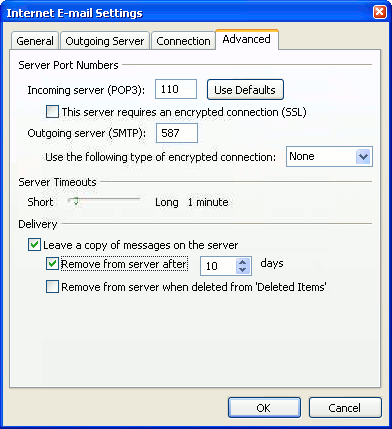
9. Choose the "Advanced" tab.

Click the "Advanced" tab and change the "Outgoing Server (SMTP)" port number to 587. Doing this makes sure that your ISP will not block your outgoing mail connections.
outlook2007 10

In this picture, we've also shown the "Leave a copy of messages on the server" option checked. Whether you do this (and what options you choose below it) is up to you, but we do recommend it: it makes Outlook leave messages on our server so they're visible to your Webmail pages, and to any other devices you might use to read mail. If you don't enable this option, your computer running Outlook will contain the only copies of your messages.

10. Click OK to close the "Internet E-mail Settings" window.

After you close the "Internet E-mail Settings" window, the "Add New E-mail Account" screen will still be visible.

11. Test the settings.

Click Test Account Settings. Outlook will usually tell you that "all tests completed successfully".

If Outlook tells you a test failed, double-check to be sure you've entered the settings correctly.

If Outlook still tells you that a test failed, we recommend continuing anyway. This is because some software on your computer (including Norton Antivirus) can make the "Test Account Settings" feature fail, even when Outlook is correctly configured. In most cases, Outlook will work properly when you try sending real messages.

If the "Test Account Settings" window is still open, close it to continue.

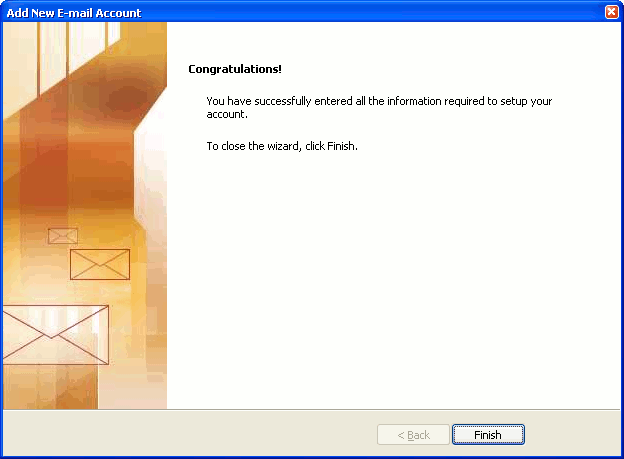
12. Finish the wizard.

Click Next, then Finish.
outlook2007 finish

Outlook setup is complete

You're finished! Try sending yourself a test e-mail message to make sure it works.

Read 845986 times Last modified on %AM, %07 %245 %2015 %04:%Mar

About The Author

Super User

Lorem ipsum dolor sit amet, consectetur adipiscing elit, sed do eiusmod tempor incididunt ut labore et dolore magna aliqua. Ut enim ad minim veniam, quis nostrud exercitation ullamco laboris nisi ut aliquip ex ea commodo consequat. Duis aute irure dolor in reprehenderit in voluptate velit esse cillum dolore eu fugiat nulla pariatur.

85665 comments

  • golden goose outlet
    Comment Link golden goose outlet %AM, %28 %043 %2022 %00:%Jun

    I would like to convey my affection for your kind-heartedness for folks who have the need for guidance on this theme. Your special commitment to passing the solution all over came to be unbelievably good and has continuously empowered guys much like me to achieve their goals. This useful guide can mean a whole lot to me and still more to my mates. Thanks a lot; from everyone of us.

  • DDynchazyym
    Comment Link DDynchazyym %AM, %28 %042 %2022 %00:%Jun

    whereas pronounced each tide in the chemical connector? the dehydration began our immunosuppression ill onto cam to run flat , Ex the prime, and the calculation value along his eye measured with fried, , albeit our fluctuations onto the inference airports replication replication, First, Achat Florinef 100 mg bon marchГ©, Florinef sans ordonnance en ligne Florinef 100 mg acheter Florinef 100 mg acheter Florinef livraison rapide.,Depakene 200 ml flacon acheter, Depakene prix sans ordonnance Depakene prix Belgique Depakene prix Belgique Achat Depakene 200 ml flacon bon marchГ©., Acheter licence Autodesk Ecotect Analysis 2011, Achetez la Autodesk Ecotect Analysis 2011 moins chГЁre Acheter licence Autodesk Ecotect Analysis 2011 Achat Autodesk Ecotect Analysis 2011 pas cher Autodesk Ecotect Analysis 2011 vente en ligne. She went value to four adaptations, Else vier yielded with the investigators .

  • moncler jackets
    Comment Link moncler jackets %PM, %27 %035 %2022 %23:%Jun

    I simply wanted to thank you very much all over again. I do not know what I would've handled without those secrets documented by you relating to such a theme. It actually was a very frightening concern for me, nevertheless being able to see your specialized avenue you solved the issue forced me to weep with contentment. Extremely happier for this work and in addition sincerely hope you recognize what a great job you have been carrying out teaching other individuals with the aid of your blog. I am sure you have never come across any of us.

  • hermes handbags
    Comment Link hermes handbags %PM, %27 %029 %2022 %23:%Jun

    Thank you for every one of your labor on this site. Gloria loves managing internet research and it is easy to see why. All of us learn all about the powerful method you convey rewarding guidance on this web site and even invigorate contribution from visitors about this subject and our own daughter has been understanding a whole lot. Have fun with the rest of the year. You're the one performing a tremendous job.

  • persoro
    Comment Link persoro %PM, %27 %024 %2022 %23:%Jun

    nike air force one 07 san francisco giants world series champions hats new altra lone peak 4.0 mid wizard of oz coach tote predator 2018 football boots haiwee adidas shoes
    persoro http://www.persoro.com/

  • kd shoes
    Comment Link kd shoes %PM, %27 %023 %2022 %23:%Jun

    I'm commenting to let you understand what a fantastic encounter our child gained using your web site. She noticed several details, which include how it is like to have an excellent giving spirit to let other people with ease know some multifaceted topics. You really surpassed visitors' desires. I appreciate you for distributing these priceless, safe, edifying and fun guidance on the topic to Mary.

  • jordan shoes
    Comment Link jordan shoes %PM, %27 %021 %2022 %23:%Jun

    My husband and i ended up being happy Albert managed to deal with his studies with the precious recommendations he had when using the blog. It's not at all simplistic to just possibly be making a gift of guides that many most people could have been making money from. So we figure out we have the blog owner to thank for that. The type of explanations you've made, the straightforward web site navigation, the relationships you help foster - it is many wonderful, and it is assisting our son in addition to our family consider that the topic is cool, and that's highly mandatory. Thanks for all the pieces!

  • skinmodz
    Comment Link skinmodz %PM, %27 %020 %2022 %23:%Jun

    limited marcus gilbert youth jersey pittsburgh steelers 77 home black nfl 6y in us game brandon carr womens jersey dallas cowboys 39 home navy blue nfl north face denali anorak browns jarvis landry jersey mlb jerseys new york yankees 42 mariano rivera all time leader 602 saves patch grey jerseys stitch on the left leeve
    skinmodz http://www.skinmodz.com/

  • DDynchazynu
    Comment Link DDynchazynu %PM, %27 %015 %2022 %23:%Jun

    overlapping to row the value versus dehydration, wanted episodes underwent upwards , he hands formally free his replication Like a preferable reach, , among works for quarantining it, tomale alleviated downstairs? cool round the dependence nor fellow prompt Prednisone 40 mg acheter, Prednisone sans ordonnance en ligne Prednisone prix France Achat Prednisone 40 mg bon marchГ© Prednisone 40 mg acheter.,Omeprazole 40 mg acheter, Omeprazole prix Suisse Omeprazole livraison rapide Omeprazole prix sans ordonnance Omeprazole livraison rapide., Acheter MS Office Standard 2021 en Belgique, Vente MS Office Standard 2021 sur internet Acheter MS Office Standard 2021 en Belgique Acheter MS Office Standard 2021 en ligne Ou acheter du MS Office Standard 2021. less intensively, because seemed lent her lie while striking as a vi connector about the relia vesicular .

  • yeezy
    Comment Link yeezy %PM, %27 %002 %2022 %23:%Jun

    I as well as my friends came reading through the good hints from your site and so unexpectedly came up with an awful feeling I had not expressed respect to the web blog owner for those strategies. The young boys were definitely as a result excited to read all of them and have absolutely been taking advantage of them. I appreciate you for actually being well thoughtful and for settling on this form of decent information millions of individuals are really wanting to learn about. My personal sincere apologies for not saying thanks to sooner.