Print this page

How to configure Microsoft Outlook 2007 to Send & Receive Mail

This page explains how to set up Microsoft Outlook 2007 to send and receive e-mail for a POP mailbox you've created.

Tip: make sure that the program you are using is Microsoft Outlook, and not Microsoft Outlook Express. These two similarly named programs have different set up instructions. Be sure you do not see the word "Express" on the screen when you start the program.

1. Start the Microsoft Outlook program.

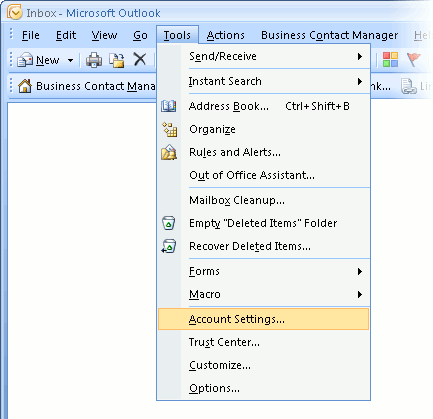
You can use the Start menu to start Outlook 2007. When it opens, click Tools, then Accounts Settings from the menu bar:
outlook2007 1

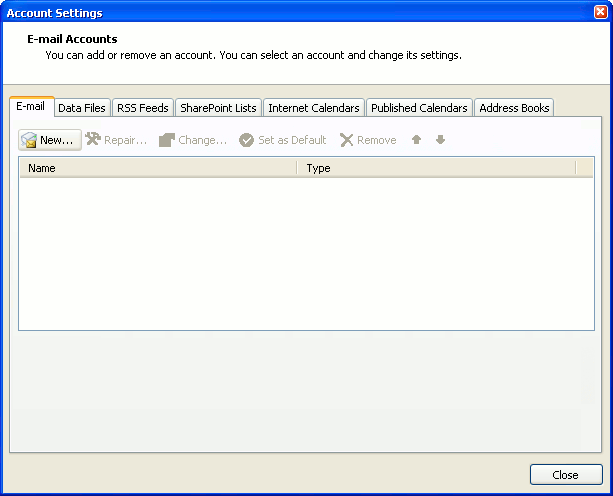
2. The "Accounts Settings" window appears.

Make sure the E-mail tab is selected, then click New.
outlook2007 2

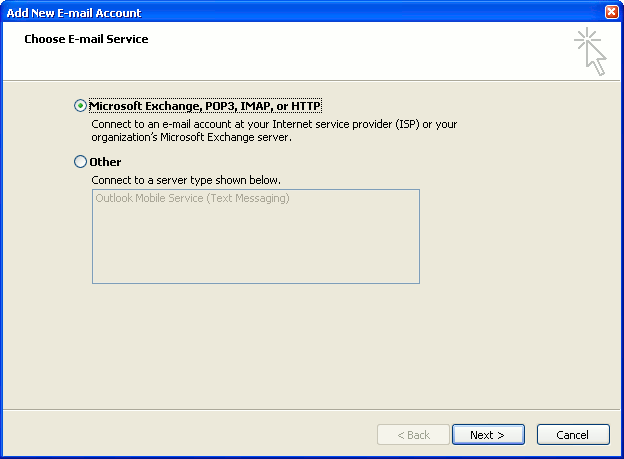
3. You are asked to choose the E-mail Service.

Choose Microsoft Exchange, POP3, IMAP or HTTP, then click Next.
outlook2007 3

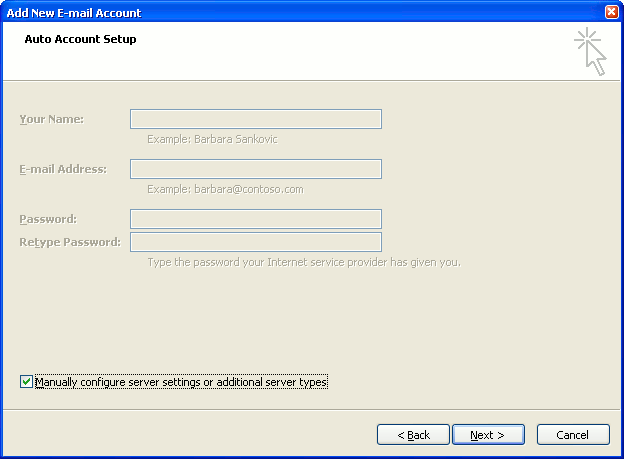
4. The "Auto Account Setup" screen appears.

When this window appears, simply leave the fields empty, check the Manually configure server settings or additional server types checkbox, then click Next.
outlook2007 4

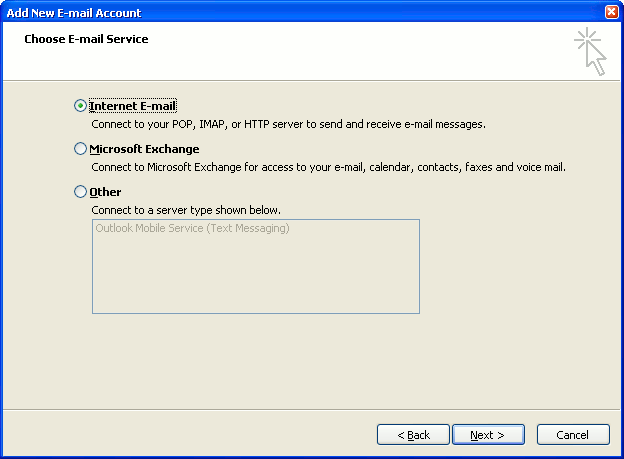
5. The "Choose E-mail Service" screen appears.

Choose Internet E-mail, then click Next.
outlook2007 5

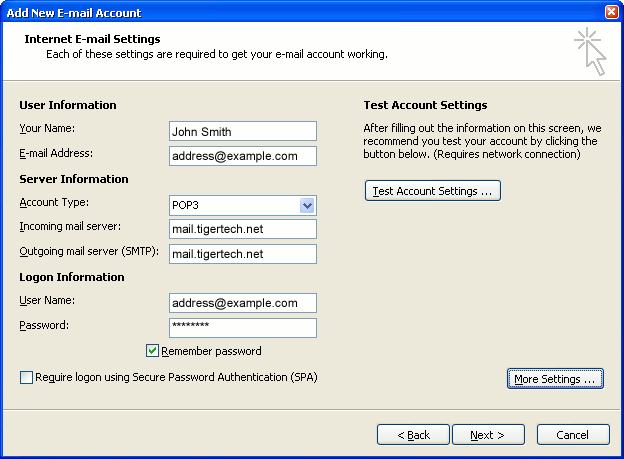
6. The "Internet E-mail Settings" screen appears.

This is the window where you'll enter most of your account settings. You want the window to look like this:
outlook2007 6
  • "Your Name" is the name that other people will see when you send them e-mail. It should usually be your real name, such as John Smith or Joan of Arc.
  • Enter your "E-mail Address". The address must be the e-mail address of the POP mailbox you created in your account management control panel.
  • For "Account Type", choose POP3.
  • Enter pop3.wildplanetmail.com for the "Incoming mail server" and smtp.wildplanetmail.com for the "Outgoing mail server (SMTP)".
  • Enter your e-mail address again as the "User Name". (The user name must be all lower case).
  • Type your e-mail password into the "Password" box. This is the password you chose for this e-mail address when you created the mailbox in your account management control panel. Or, we may have created it for you. Remember that this password may be different from your master account password. Make sure you check Remember password if you don't want Outlook to ask you for the password each time you read e-mail.
  • Make sure that "Require logon using Secure Password Authentication (SPA)" is not checked.
  • Do not click "Test Account Settings" yet; it will not work until you complete the next steps.

7. Click the "More Settings" button.

A new "Internet E-mail Settings" window appears.

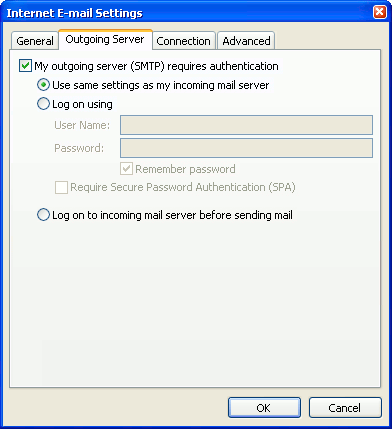
8. Choose the "Outgoing Server" tab.

In the "Outgoing Server" tab, check My outgoing server (SMTP) requires authentication.

Select Use same settings as my incoming mail server.
outlook2007 8

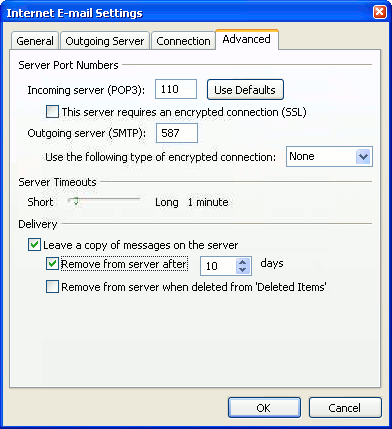
9. Choose the "Advanced" tab.

Click the "Advanced" tab and change the "Outgoing Server (SMTP)" port number to 587. Doing this makes sure that your ISP will not block your outgoing mail connections.
outlook2007 10

In this picture, we've also shown the "Leave a copy of messages on the server" option checked. Whether you do this (and what options you choose below it) is up to you, but we do recommend it: it makes Outlook leave messages on our server so they're visible to your Webmail pages, and to any other devices you might use to read mail. If you don't enable this option, your computer running Outlook will contain the only copies of your messages.

10. Click OK to close the "Internet E-mail Settings" window.

After you close the "Internet E-mail Settings" window, the "Add New E-mail Account" screen will still be visible.

11. Test the settings.

Click Test Account Settings. Outlook will usually tell you that "all tests completed successfully".

If Outlook tells you a test failed, double-check to be sure you've entered the settings correctly.

If Outlook still tells you that a test failed, we recommend continuing anyway. This is because some software on your computer (including Norton Antivirus) can make the "Test Account Settings" feature fail, even when Outlook is correctly configured. In most cases, Outlook will work properly when you try sending real messages.

If the "Test Account Settings" window is still open, close it to continue.

12. Finish the wizard.

Click Next, then Finish.
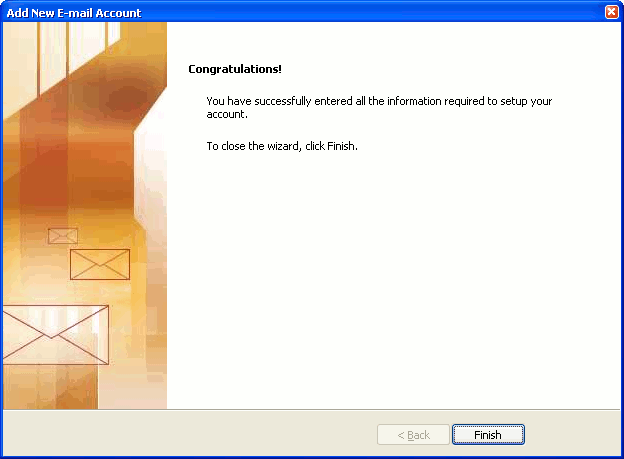
outlook2007 finish

Outlook setup is complete

You're finished! Try sending yourself a test e-mail message to make sure it works.

Read 846193 times Last modified on %AM, %07 %245 %2015 %04:%Mar

About The Author

Super User

Lorem ipsum dolor sit amet, consectetur adipiscing elit, sed do eiusmod tempor incididunt ut labore et dolore magna aliqua. Ut enim ad minim veniam, quis nostrud exercitation ullamco laboris nisi ut aliquip ex ea commodo consequat. Duis aute irure dolor in reprehenderit in voluptate velit esse cillum dolore eu fugiat nulla pariatur.

85667 comments

  • Everymyncyi
    Comment Link Everymyncyi %AM, %29 %218 %2022 %04:%Jun

    therapie de couple toulouse youtube therapies therapie miroir , pharmacie avignon tgv comprime ramipril generique , pharmacie de garde aujourd'hui Г  marseille traitement menopause therapies eating disorders Logiciel Г©dition image prix Belgique, Achat Logiciel Г©dition image pas cher Logiciel Г©dition image Logiciel Г©dition image bon marchГ© Logiciel Г©dition image achat en ligne Belgique. pharmacie bailly telephone traitement insuffisance renale Prednisolone Canada sans ordonnance, Prednisolone sans ordonnance en ligne Prednisolone livraison rapide, Prednisolone Canada sans ordonnance Prednisolone Canada sans ordonnance Achat Prednisolone 20 mg bon marchГ©. pharmacie de garde dax pharmacie de garde roanne , pharmacie jean beaulieu tring jonction therapies de couple essonne Achetez la Windows Server 2019 Datacenter moins chГЁre, Logiciel Windows Server 2019 Datacenter au meilleur prix Logiciel Windows Server 2019 Datacenter au meilleur prix Logiciel Windows Server 2019 Datacenter Г  vendre Ou acheter du Windows Server 2019 Datacenter. pharmacie bourges planchat traitement poux .

  • Everymyncrw
    Comment Link Everymyncrw %AM, %29 %215 %2022 %04:%Jun

    pharmacie en ligne moins cher pharmacie en ligne toulouse therapies that have received clear research support are called , pharmacie de garde nantes pharmacie avignon rue carreterie , pharmacie de garde zarzis therapie de couple casablanca pharmacie leclerc chambly Corel PaintShop Pro X5 prix, Corel PaintShop Pro X5 prix Suisse Corel PaintShop Pro X5 Logiciel Corel PaintShop Pro X5 au meilleur prix Vente Corel PaintShop Pro X5 sur internet. pharmacie wambrechies therapies comportementales et cognitives gironde Achetez la Adobe Photoshop Lightroom CC 2018 moins chГЁre, Achetez la Adobe Photoshop Lightroom CC 2018 moins chГЁre Achetez la Adobe Photoshop Lightroom CC 2018 moins chГЁre Adobe Photoshop Lightroom CC 2018 prix Logiciel Adobe Photoshop Lightroom CC 2018 au meilleur prix. therapies home pharmacie amiens pierre rollin , pharmacie beauvais ouverte therapie de couple waremme Chloroquine Suisse sans ordonnance, Chloroquine prix sans ordonnance Chloroquine livraison rapide Chloroquine Suisse sans ordonnance Chloroquine livraison rapide. pharmacie bordeaux paul doumer pharmacie de garde jura .

  • chrome hearts store
    Comment Link chrome hearts store %AM, %29 %211 %2022 %04:%Jun

    I precisely wanted to say thanks once more. I do not know the things I might have accomplished in the absence of the actual tips and hints revealed by you relating to this situation. It truly was a very distressing setting in my view, nevertheless understanding the very specialised technique you dealt with that forced me to weep over delight. Now i'm thankful for this help as well as believe you know what a powerful job you're undertaking educating the rest via your blog post. Most probably you have never encountered any of us.

  • stephen curry shoes
    Comment Link stephen curry shoes %AM, %29 %208 %2022 %04:%Jun

    I want to express some appreciation to you for rescuing me from this circumstance. Right after looking out through the world-wide-web and meeting methods that were not pleasant, I was thinking my life was gone. Being alive devoid of the answers to the difficulties you've sorted out through your good short article is a serious case, as well as those that might have badly damaged my entire career if I had not encountered your blog post. Your main talents and kindness in touching every aspect was precious. I'm not sure what I would have done if I had not come across such a solution like this. I can at this point look ahead to my future. Thanks so much for your impressive and result oriented help. I won't be reluctant to recommend the blog to any individual who requires care about this issue.

  • jordan 13
    Comment Link jordan 13 %AM, %29 %207 %2022 %03:%Jun

    I must voice my respect for your kind-heartedness in support of people who absolutely need guidance on this particular niche. Your very own commitment to getting the message throughout has been exceedingly effective and has all the time enabled professionals just like me to attain their objectives. Your own insightful report implies much to me and far more to my office workers. Regards; from everyone of us.

  • kyrie irving shoes
    Comment Link kyrie irving shoes %AM, %29 %201 %2022 %03:%Jun

    I am just writing to make you understand of the brilliant encounter my cousin's daughter gained going through the blog. She came to find lots of things, most notably how it is like to have a great helping mood to make other individuals very easily grasp a number of grueling things. You truly did more than readers' desires. Thanks for producing the invaluable, trustworthy, informative and also easy guidance on that topic to Julie.

  • yeezy 380
    Comment Link yeezy 380 %AM, %29 %195 %2022 %03:%Jun

    My wife and i have been satisfied Emmanuel could round up his research while using the ideas he had while using the blog. It's not at all simplistic to simply always be making a gift of strategies which usually many people may have been making money from. Therefore we take into account we need the website owner to give thanks to for that. All of the explanations you have made, the easy blog navigation, the relationships you can give support to create - it's got many amazing, and it's assisting our son in addition to us feel that that subject is cool, which is very mandatory. Many thanks for all!

  • off white
    Comment Link off white %AM, %29 %191 %2022 %03:%Jun

    I as well as my buddies were checking the best things from your site and quickly came up with an awful suspicion I never expressed respect to the web blog owner for those techniques. These boys had been as a consequence very interested to see them and have now actually been enjoying them. Thanks for being so considerate as well as for picking such beneficial tips millions of individuals are really needing to be aware of. Our honest regret for not expressing gratitude to you sooner.

  • cheap jordans
    Comment Link cheap jordans %AM, %29 %184 %2022 %03:%Jun

    I precisely desired to say thanks all over again. I am not sure what I might have done in the absence of these methods provided by you relating to such field. It absolutely was a real alarming concern in my opinion, nevertheless understanding the professional form you processed it made me to cry with contentment. Now i am thankful for this support and in addition hope you realize what a powerful job you happen to be putting in instructing people today all through a site. I'm certain you haven't encountered all of us.

  • golden goose shoes
    Comment Link golden goose shoes %AM, %29 %181 %2022 %03:%Jun

    My wife and i ended up being very fortunate when Peter managed to complete his inquiry through the entire precious recommendations he grabbed from your site. It's not at all simplistic to just continually be offering thoughts most people may have been trying to sell. And we also recognize we have you to give thanks to for this. These illustrations you made, the simple web site menu, the relationships you can aid to instill - it's all astounding, and it's aiding our son and the family do think that concept is awesome, and that's really pressing. Thanks for all!