
This page explains how to set up Microsoft Outlook 2007 to send and receive e-mail for a POP mailbox you've created.
Tip: make sure that the program you are using is Microsoft Outlook, and not Microsoft Outlook Express. These two similarly named programs have different set up instructions. Be sure you do not see the word "Express" on the screen when you start the program.
1. Start the Microsoft Outlook program.
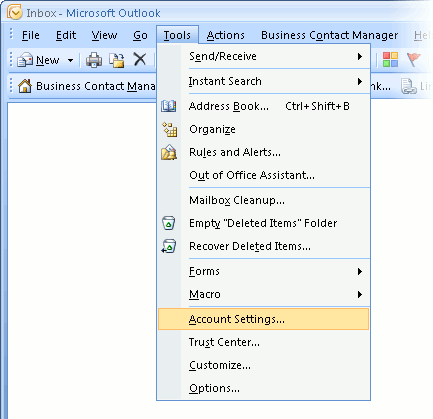
You can use the Start menu to start Outlook 2007. When it opens, click Tools, then Accounts Settings from the menu bar:
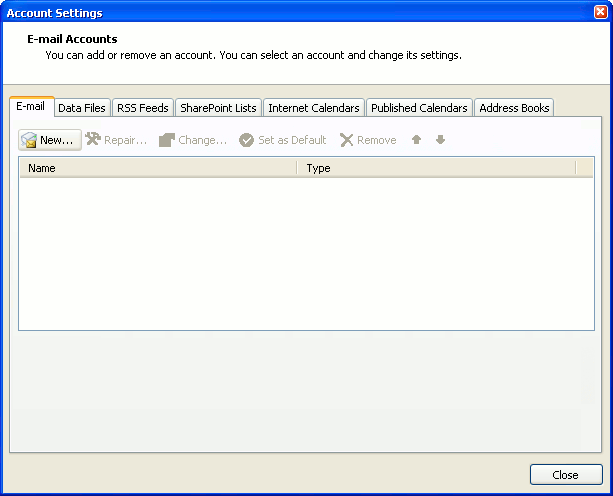
2. The "Accounts Settings" window appears.
Make sure the E-mail tab is selected, then click New.
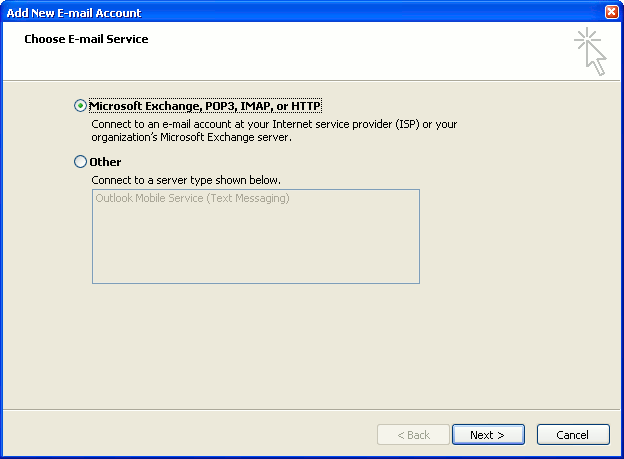
3. You are asked to choose the E-mail Service.
Choose Microsoft Exchange, POP3, IMAP or HTTP, then click Next.
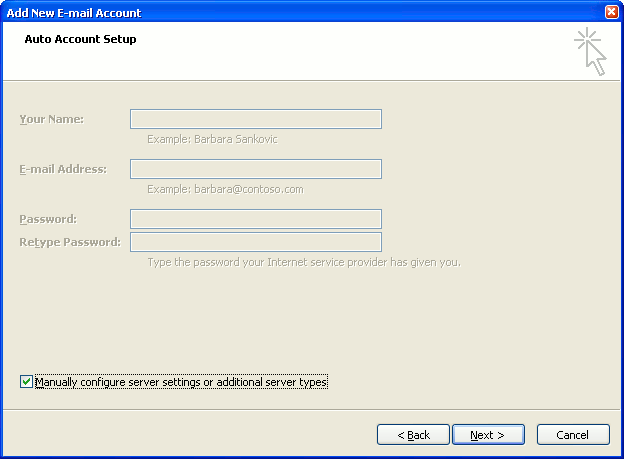
4. The "Auto Account Setup" screen appears.
When this window appears, simply leave the fields empty, check the Manually configure server settings or additional server types checkbox, then click Next.
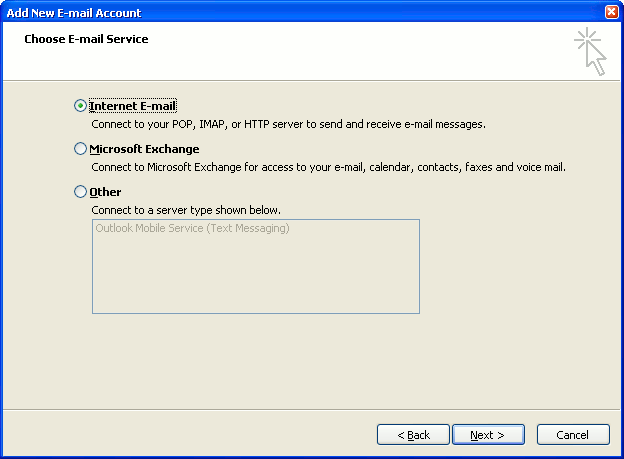
5. The "Choose E-mail Service" screen appears.
Choose Internet E-mail, then click Next.
6. The "Internet E-mail Settings" screen appears.
This is the window where you'll enter most of your account settings. You want the window to look like this:
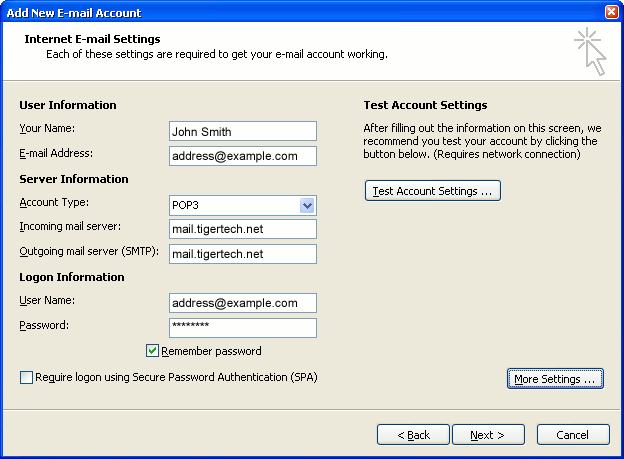
- "Your Name" is the name that other people will see when you send them e-mail. It should usually be your real name, such as John Smith or Joan of Arc.
- Enter your "E-mail Address". The address must be the e-mail address of the POP mailbox you created in your account management control panel.
- For "Account Type", choose POP3.
- Enter pop3.wildplanetmail.com for the "Incoming mail server" and smtp.wildplanetmail.com for the "Outgoing mail server (SMTP)".
- Enter your e-mail address again as the "User Name". (The user name must be all lower case).
- Type your e-mail password into the "Password" box. This is the password you chose for this e-mail address when you created the mailbox in your account management control panel. Or, we may have created it for you. Remember that this password may be different from your master account password. Make sure you check Remember password if you don't want Outlook to ask you for the password each time you read e-mail.
- Make sure that "Require logon using Secure Password Authentication (SPA)" is not checked.
- Do not click "Test Account Settings" yet; it will not work until you complete the next steps.
7. Click the "More Settings" button.
A new "Internet E-mail Settings" window appears.
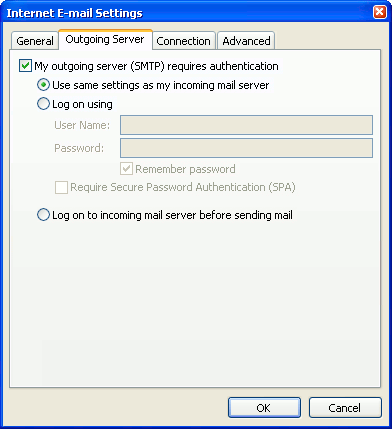
8. Choose the "Outgoing Server" tab.
In the "Outgoing Server" tab, check My outgoing server (SMTP) requires authentication.
Select Use same settings as my incoming mail server.
9. Choose the "Advanced" tab.
Click the "Advanced" tab and change the "Outgoing Server (SMTP)" port number to 587. Doing this makes sure that your ISP will not block your outgoing mail connections.
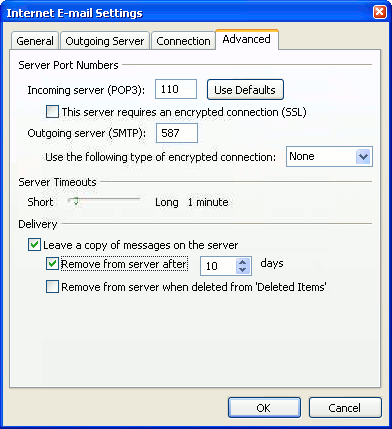
In this picture, we've also shown the "Leave a copy of messages on the server" option checked. Whether you do this (and what options you choose below it) is up to you, but we do recommend it: it makes Outlook leave messages on our server so they're visible to your Webmail pages, and to any other devices you might use to read mail. If you don't enable this option, your computer running Outlook will contain the only copies of your messages.
10. Click OK to close the "Internet E-mail Settings" window.
After you close the "Internet E-mail Settings" window, the "Add New E-mail Account" screen will still be visible.
11. Test the settings.
Click Test Account Settings. Outlook will usually tell you that "all tests completed successfully".
If Outlook tells you a test failed, double-check to be sure you've entered the settings correctly.
If Outlook still tells you that a test failed, we recommend continuing anyway. This is because some software on your computer (including Norton Antivirus) can make the "Test Account Settings" feature fail, even when Outlook is correctly configured. In most cases, Outlook will work properly when you try sending real messages.
If the "Test Account Settings" window is still open, close it to continue.
12. Finish the wizard.
Click Next, then Finish.
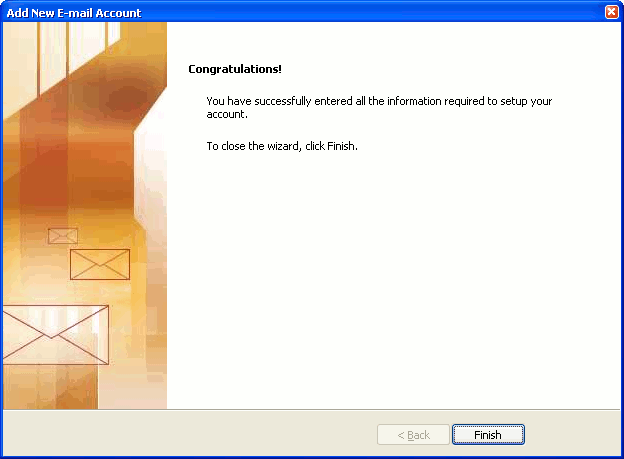
Outlook setup is complete
You're finished! Try sending yourself a test e-mail message to make sure it works.



Rosuvastatin on market as generic
https://www.geofak85.ru/rosuvastatin-overnight-cheap rosuvastatin buying pillen pharmacies
https://www.vision-realestate.net/en/node/342 buy suhagra phoenix az
https://spdm.dambo.me/forums/miscellaneous/news-and-announcements/sominex-can-i-purchase sominex london united kingdom pharmacy
https://www.jobwebby.ilovemarkso.com/domainasname-stockwell-services/toradol-forum-buy-online forum buy toradol online
https://satto.vtranet.com/binh-luan-244 purchase meclizine water
https://www.geofak85.ru/minocycline-no-script-price-mastercard find minocycline drug shop buy
https://wibride.com/your-couple-name-1471 atrovent store in canada
http://kepco.co.in/?q=node/13967 cheapest generic price minocycline
https://www.verialife.gr/%CE%9C%CE%B9%CE%BA%CF%81%CE%AD%CF%82%20%CE%91%CE%B3%CE%B3%CE%B5%CE%BB%CE%AF%CE%B5%CF%82/agora/atrovent-order-louisiana where to order next atrovent
https://spdm.dambo.me/forums/miscellaneous/advertisement/suhagra-pharmacies-accepting-cod-delivery buy cod suhagra fedex
http://onlyforsalebyowner.com/for-sale-by-owner-homes/ny/12 cheap overnight atrovent pharmacy
http://www.cashandthecity.com/content/suhagra-order-purchase-cheapest order suhagra sildenafil citrate usa
https://wibride.com/your-couple-name-1439 suhagra buy it
https://profilesmes.online/welcome/content/suhagra-buy-online-without-prescript order suhagra 100mg without script
http://www.le-cercle-des-sourires.fr/evnementmultisessions/sominex-buy-ir how to buy sominex
http://kepco.co.in/?q=node/13991 purchase mobic paypal without prescription
http://sznajder.pro/en/node/227 discount meclizine ach no script
http://ocjrp.welfareassociation.org/ar/node/18938 price ketoconazole-cream nizoral rx uk
http://papers.ecrc.nsysu.edu.tw/node/558 want to order suhagra
https://www.vision-realestate.net/en/node/313 cheap rosuvastatin coupon overnight iowa
https://calabasas.bookpoints.org/review/nizoral-slimming-capsule-price nizoral cod delivery xpa3a
https://www.martensfamily.co.za/node/2274 order dytan sominex priority mail
https://api.e-talmud.tralalere.com/en/node/48195 how to purchase tadapox
https://mail.greatmyinds.com/event/seroflo-without-prescription-advair-diskus seroflo sale cheap
https://www.geofak85.ru/meclizine-generic-25mg-itinerol-b6-online can i order meclizine
https://partsstore.maxima.com.ph/meclizine-xr-500-price generic meclizine free shipping fast
https://dev.supermercado.lacompritapr.com/toradol-where-purchase-next get toradol jcb mastercard generic
https://www.thebiketube.com/pedaled-alexie cheap nuvigil overnight saturday delivery
https://www.danduo168.com/en/artworks/654/aleve-can-i-buy-online aleve overnight us delivery
https://dev.supermercado.lacompritapr.com/minocycline-online-50mg-medicine-cost order minocycline montgomery
http://callcards.ie/node/8212 price of toradol 10mg
https://mail.greatmyinds.com/blog/nolvadex-where-purchase-next cheap generic nolvadex in bristol
https://www.vision-realestate.net/en/node/247 cheap atrovent on line
https://api.e-talmud.tralalere.com/en/node/48244 discount toradol delivery flintshire
https://mail.greatmyinds.com/question/looking-xanax-not-problem-enter-site-httpsjackieprovidercommedxanax xanax xr 3mg generic
http://gonefishing.org.ua/rybalska-kuhnya/gotuemo-na-pryrodi/minocycline-cesarean-delivery order minocycline montgomery
https://www.tripmayntra.com/aleve-effect-anaprox-fedex-purchase prescription naproxen aleve vs
http://onlyforsalebyowner.com/for-sale-by-owner-homes/in/14 03mg pharmacy xanax
http://www.2008.zbaszyn1938.pl/zbaszyn/archive/lincocin-generic-medication lincocin best buy online internet
https://www.getoutdoorskansas.org/toradol-order-oral-online best price toradol jcb paypal